- Spotify is a popular music streaming service with over 80 million tracks
- Most DJ software no longer integrates with Spotify, but there are some workarounds
- Discover a list of alternative DJ apps
- Also, check out our post on the best music streaming services
Spotify is one the world’s largest free online music streaming services, with over 456 million active users around the globe as of early 2022.
No matter what type of tracks you are looking for, Spotify now has over 80 million tracks on the platform and is constantly growing.
Although most popular DJ software no longer integrates Spotify playlists as standard, there is a Spotify DJ mode and some workarounds you can use to DJ with Spotify in 2023.
Note: All statistics come from The Social Shepherd stats site @ https://thesocialshepherd.com/blog/spotify-statistics
Can You DJ With Spotify?
Yes, you can, but you may have to jump through a few hoops first. Unfortunately, in 2020, Spotify suspended the access of the leading DJ software platforms to their vast online catalog.
Options are limited to specifically licensed tracks on a few select lesser-known DJ platforms or the limited Spotify DJ Mode.
You could always download the tracks if you want to use your Traktor or Serato controller. But is this your best option, and is it legal?
Let’s take a look!
The Obstacles of Djing with Spotify
What does the July 2020 decision to make Spotify unplayable through any 3rd party DJ app mean for the leading DJ platforms?
Popular DJ applications, such as Virtual DJ, Traktor, and Serato (to name a few), all have their obstacles to overcome if you want to use that huge track library in your next set.
From not being able to access the Spotify library or DRM issues with any Spotify tunes, you may have to look somewhere else for those tracks.
Then there’s the whole online issue. Streaming music can be unpredictable at the best of times if your internet connection isn’t entirely up to it.
Let’s take a look at the leading DJ platforms below and the obstacles each presents if you should want to DJ with Spotify.
DJ Software & Spotify Integration
1. Algoriddim DJay
The original streaming DJ app!
As one of the first DJ apps to actively promote DJing from streaming services, the integration of Spotify was seen as a giant leap forward in the world of digital djing.
Although Spotify is no longer available on Algoriddim, both Soundcloud and TIDAL are worth checking out as they can be used easily with the DJay app.
Many of these replacement streaming services offer a much more robust solution for many DJs and tend to be aimed more at the EDM and dance scene.
However, they do come at a cost, with no free-to-stream services available, only premium subscriptions. Not too bad if you are a regular gigging pro-DJ but not as wallet-friendly for those just wanting to practice at home.
2. Virtual DJ
A popular workhorse of a DJ app.
Along with Algoriddim’s DJay app, Virtual DJ is one of the most popular DJ packages for DJs of all levels. Many DJs use it as a karaoke program, a limited resource for video djing, and is another app great for streaming.
However, at the time of going to press, the Spotify streaming service has currently suspended the access of VDJ to their vast library.
Virtual DJ allows DJs to use paid streaming services such as SoundCloud DJ, TIDAL, Beatport, Beatsource, Deezer, iDJPool, VJ-Pro, and KaraokeCloud.
SoundCloud and Beatport even offer subscription models allowing offline storage of the tracks for playing when you are not online.
3. Serato Pro
The world’s leading DJ app supported by most DJ hardware suppliers.
In terms of overall popularity in the DJ world, especially the scratch-turntablists of the timecode vinyl scene, you don’t get much bigger than Serato.
Unfortunately, just like their main competitor Traktor, Serato Pro does not currently support importing Spotify’s music into their library. Not officially, anyhow (we’ll look into some options a little later).
Many Serato users are quick to claim there are a few workarounds that can fix the issue (Soundiiz.com is a service that can transfer your Spotify playlists to TIDAL, which Serato can access).
However, the smaller track library of TIDAL often means big chunks of your playlist may need to be included).
It may be better to wait until the two companies potentially make a deal or look at one of the more legitimate options of Beatsource, Beatport, Tidal, or Soundcloud (all supported by Serato).
4. Traktor
The world’s “other” leading DJ app!

For DJs who like their controllers, Traktor has always been one of the leading software choices. Sadly as we have already mentioned, just as with Serato, there is no way of playing Spotify songs with Traktor.
Although other services say Spotify has “suspended” the service, with Traktor, it comes down to Digital Rights Management.
Spotify has simply decided to block off access to their library due to Traktor and their parent company not making a licensing deal for Spotify music.
Fear not there are other options for streaming in Traktor DJ. Provided you are running Traktor DJ software version 3.5 or higher, you can stream from Beatport Link, which is great for those interested in serious dance music.
5. RekordBox
Pioneer’s proprietary music management and DJ performance app.
Although RekordBox is marketed as the ultimate music management tool and DJ performance software which allows you to stream your own libraries from the cloud, it still doesn’t support Spotify playlists and music.
Instead, you can choose Apple Music, TIDAL, Beatport, Inflyte, Beatsource, and SoundCloud. Everything but Spotify! Doh!
Apps That Do Allow You to DJ with Spotify (sort of….)
1. Pacemaker
Originally a handheld DJ device, Pacemaker is now a digital DJ solution designed especially for mixing from streaming services such as Apple Music (the app is currently only available on Apple devices) and Spotify.
If you haven’t updated your Pacemaker app since 2020, the DJ program may still be 100% compatible with Spotify, but the latter versions only allow you to use licensed Spotify tracks.
Simply syncing your Spotify playlist to the app can help you identify the Spotify songs you can DJ with on Pacemaker.
2. JQBX
JQBX is a DJ app that still has access to the Spotify online library, but only for listening to the tracks now and chatting with friends or other DJs in a public chatroom.
Initially, it supported creating mixes from Spotify tracks, but currently, the DJ room of the website for DJing with Spotify songs has disappeared. JQBX syncs with your Spotify account but only for listening to those tracks with friends and not for DJing.
3. Mixonset
Mixonset is a DJ app that explicitly sells itself as able to mix with Spotify, although you will need a premium Spotify account to use it.
As an AI DJ app, it allows you to auto-mix Spotify playlists with much smarter results than other DJ programs we have used. With the AI mixing feature, DJs, especially beginner DJs, can be inspired with more ideas.
You can even share mixes in the large online community, which is ideal for making mixes for parties. This isn’t a traditional DJ app like Serato, Traktor, or VDJ.
The main downside is that Mixonset is only compatible with iOS devices like the iPhone and iPad or the latest M! Silicon Macs.
Bonus: Mix Spotify Tracks in Any DJ App
If you are still struggling to mix songs from your Spotify playlists with your regular DJ software such as SeratoPro, Traktor, or Virtual DJ, then perhaps it’s time to take “ownership” of those streaming Spotify tracks.
Online resources such as Noteburner Spotify Music Converter, Tuneskit Music Converter, or Sidify allow you to transfer your Spotify playlists and download them as MP3, WAV, AAC, or AIFF files that retain 100% of the original quality.
Once the files have been downloaded, all the metadata, such as ID3 tags, title, artist, album artwork, and track numbers, will be preserved for helping to organize your music library.
Plus, you have the bonus of no need to connect to the internet to DJ with your “online” Spotify collection.
Of course, downloading copyrighted tracks from an online service brings up the whole legality of DJing with Spotify.
Is it Legal to DJ with Spotify in 2023?
This is where things get spicy when DJing with Spotify, and likely the primary reason why it’s so hard to. The latest terms of service of Spotify state that whether you are a novice Dj or a full-on professional DJ, you ARE NOT allowed to perform any DJ sets with their content.
This applies to both the free and premium subscriptions of Spotify.
However, violating Spotify terms of service and being illegal are not necessarily the same.
The legality of downloading copyrighted tracks for your DJ sets is clearer. Spotify terms state that the license of the content on Spotify has not been transferred to the end-user or sold to them.
In this way, it’s the same as illegally downloading a track from a torrent site.
When looking at the bigger picture of whether you can DJ with digital music or not, the answer, of course, is yes. Most DJs today wouldn’t exist without digital copies of their tracks.
Licenses such as the ProDub license from the PRS say you can commercially DJ with digital music without any further repercussions as long as the music has been properly licensed.
Again a grey area when it comes to Spotify as streaming a track is not officially the same as paying for a track and downloading it digitally.
So, the answer to the question “Is it legal to DJ with Spotify?” is still very grey. It’s certainly frowned upon, but that doesn’t make it automatically illegal.
How to DJ with Spotify DJ Mode
If Spotify frowns so much on you DJing with Spotify, why do they offer a Spotify DJ mode?
Spotify doesn’t allow DJing with Spotify in public performances, but using it at home to DJ at a small party seems to be ok and within Spotify terms of service.
And to be honest, that’s all Spotify DJ mode is suitable for, playing your favorite playlists at home to friends like you may use an Amazon Alexa and Amazon Music subscription.
What Is Spotify DJ Mode?
Spotify DJ mode is simply adding your favorite tracks to a playlist and selecting a playback mode that uses crossfades to “mix” one track into another for gapless playback.
The DJ mode also includes an AI “personality” that will speak a line or two of dialogue to you whenever you start the feature. Amusingly, many are asking how to change its voice or disable it completely.
While the name may seem to imply this is a DJ app, in reality, Spotify DJ mode is completely different from using Spotify while performing with DJ software.
You will use slightly longer fade-ins and fade-outs to transition between different songs. There’s no beat-matching, no AI that chooses a cue point to mix the song in, and no looping controls or other FX.
Can You Use A Controller With Spotify DJ Mode?
No, and why would you need to? Currently, Spotify DJ Mode doesn’t support any controllers at all, but to be honest, it doesn’t have any features which would need a controller.
Although Spotify DJ mode does support Bluetooth speakers and output to other audio devices–even with audio settings for different speakers or environments– there are no features to the DJ Mode that would need any controller. The Spotify app performs all the crossfades, fade-in, and fade-outs automatically.
Who Is Spotify DJ Mode For?
It’s certainly not going to be of any use to professional DJs, but it can be an excellent option for people who do some small-time DJing at home, either in their bedrooms or with friends. It can also be a good choice for simple events like house parties.
As you won’t actually be doing any “real” djing, there’s no need for beat-matching any songs or performing any perfectly seamless mixes (which is a good job really since you wouldn’t be able to even if you wanted).
Put simply, Spotify DJ Mode is useful for DJs who are not DJs. It’s not a completely useless feature but is not something I would recommend you try Djing out with.
Follow These Steps To “DJ” With Spotify DJ Mode
If you are hosting a small house party and want Spotify to be the DJ, it’s pretty simple and can save you the bother of setting up a small DJ booth.
Here are five steps to take your Spotify from a streaming service to the in-house DJ for your next gathering.
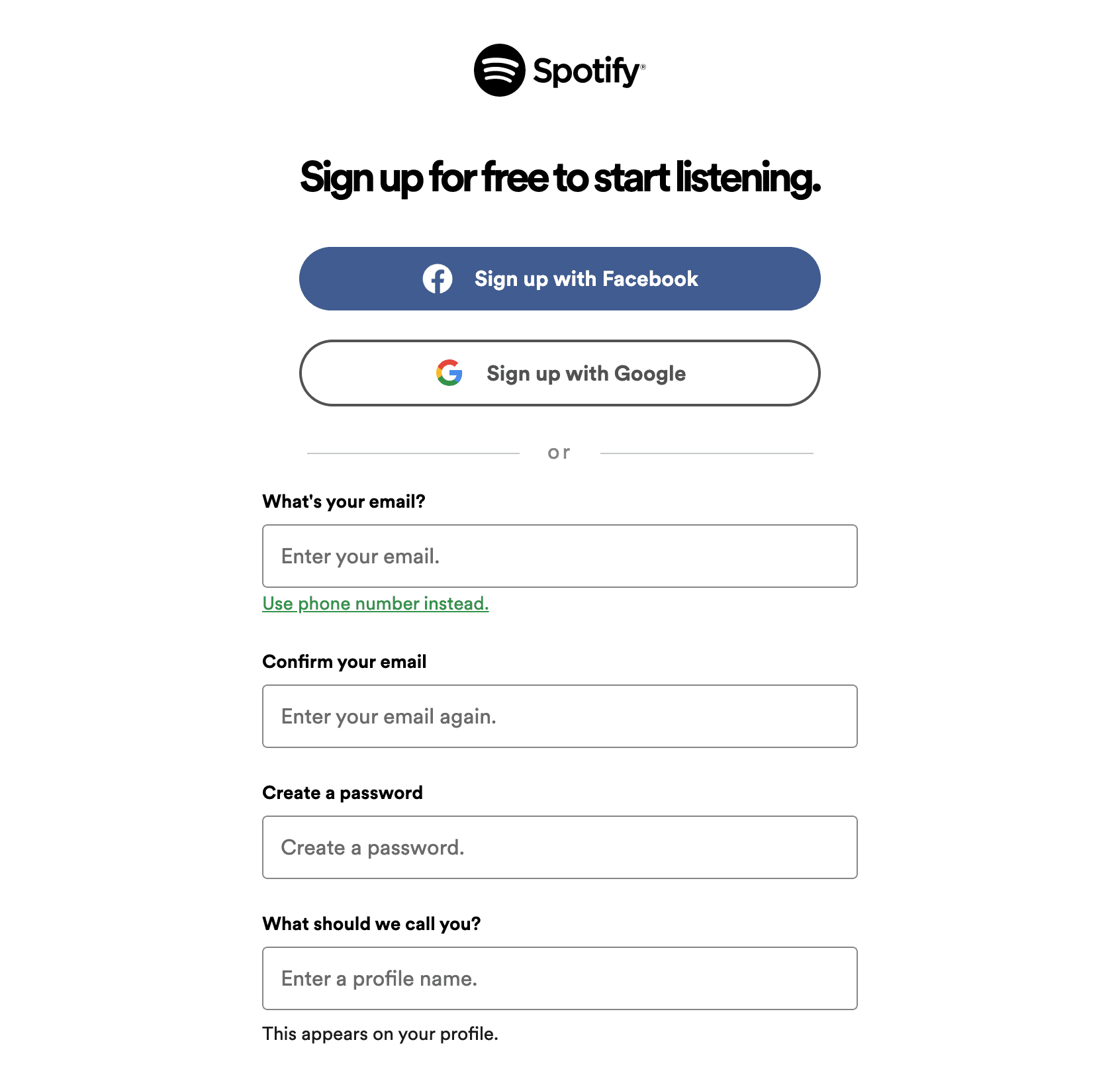
1. If you haven’t already done so, go to www.spotify.com and sign up for an account.
I would always recommend going for a Premium account if you plan to use Spotify DJ Mode–the last thing you want are pesky ads interrupting your music all night (you also get better high-definition audio quality with 320kbps with a Premium account).
2. Install the app on your desktop or mobile device.
The sound quality and buffering speed will generally improve on Spotify’s downloaded application (unfortunately, if you use a Chromebook or Linux, you will still have to use the web interface as Spotify standalone is only supported by Mac, Windows, iOS, and Android platforms).

3. Create a new playlist, adding tracks that you think are appropriate for the party–Spotify DJ Mode will only play what you tell it and has very little AI to order the tracks.

It’s always a good idea to create several different playlists, which can be changed depending on the mood or time of the party.
For example, the music you play at 3 pm at an afternoon BBQ will vary significantly from the tunes you want kicking it later as the night goes on.
4. Make Spotify crossfade songs and enter Spotify DJ Mode. Go to Settings>Playback from the Spotify interface’s home screen.
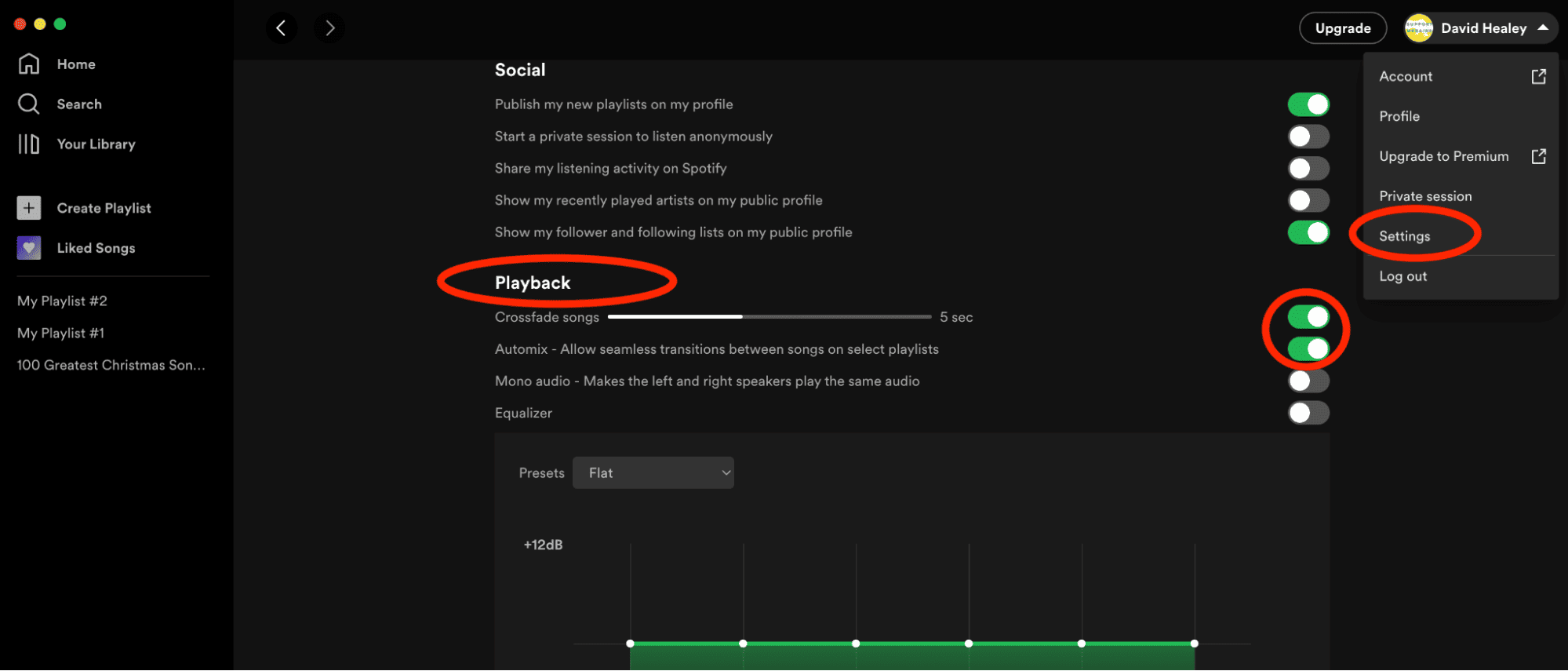
Make sure to switch on the Crossfade songs and select the length of crossfade you require. You should also switch on the Automix feature, allowing seamless transitions between songs.
5. Select your playlist and press play.
Wrapping Up
When it comes to having a library of over 80 million tracks which DJ wouldn’t be tempted by taking Spotify out on the road with them?
Unfortunately, DJing with Spotify is not as easy as it used to be since Spotify has taken away or suspended access to almost every third-party DJ app.
Yes, a couple of DJ apps still use Spotify, but they are rather limited and of little use to a professional DJ. Likewise, Spotify DJ Mode is a great option when playing tracks for friends or a small party.
Still, it’s not DJing–you can’t beat mix with Spotify DJ Mode or use a Controller with Spotify, and Spotify DJ Mode just crossfades between songs without any real mixing.
Ultimately the best way to DJ with Spotify in 2023 is by using a third-party application that enables the downloading of tracks from Spotify which can then be added to your DJ library.
No need for an extended internet connection as you DJ, and the tracks are at your fingertips at all times.
Some of the Spotify converter apps can even be opened on your desktop so you can download a track and load it into your regular DJ software as you perform.
However, remember you are still downloading copyrighted material which goes against Spotify’s terms of service (your account can get banned if you’re caught, but that’s not too likely), and the legality of such tracks is a very grey area.
Although Spotify is one of the world’s most popular streaming services with the widest varieties of tracks, other streaming platforms such as TIDAL, SoundCloud, or Beatport can be a better option for most DJs.
With less draconian terms and conditions of usage, these alternative streaming services are even integrated into the leading DJ applications.