- Which is best for making music in 2023:
Logic Pro orFL Studio ? - Discover the pros and cons of using
Logic Pro vsFL Studio - Learn how to get the most out of your music-making software!
- Also, check out our FL Studio vs Ableton Live shootout!
Depending on which DAW (Digital Audio Workstation) you choose, different strengths and weaknesses will become apparent over time.
When it comes to making and producing music,
With many years of DAW use and experience under my belt, I’ve looked at
Let’s get to it!
Logic Pro vs. FL Studio : Which Is Best?
Logic Pro is your go-to for producing live recordings or creating soundtracks for visual media, while
Let’s dive in deeper and take a proper look at each key aspect of both these DAWs. We’ll weigh up their merits to properly decide whether the strengths of one software outweigh the other.
|
|  |  |
|
Accessibility For Beginners |
Intuitive |
Small learning curve |
|
Clear GUI |
Mostly (some advanced features are hidden by default) |
Fairly complicated main layout, but has a handy navigation sidebar |
|
Creative Tools |
Many great tools |
Some great tools |
|
Compatibility |
Mac OS only |
Windows & Mac OS |
|
Cost |
$200 |
Free to $520 |
|
Updates |
Yes – not always free |
Yes – always free |
|
Processing |
64-bit, with options for saving CPU usage |
64-bit and 32-bit, with options for saving CPU usage |
|
Track Limit |
Up to 1000 tracks. Still runs smoothly up to around 500 actively used tracks |
Up to 500 tracks. Starts to run slowly after around 100 actively used tracks |
Logic Pro vs. FL Studio : Breaking It Down
Accessibility (For Beginners)
Logic Pro
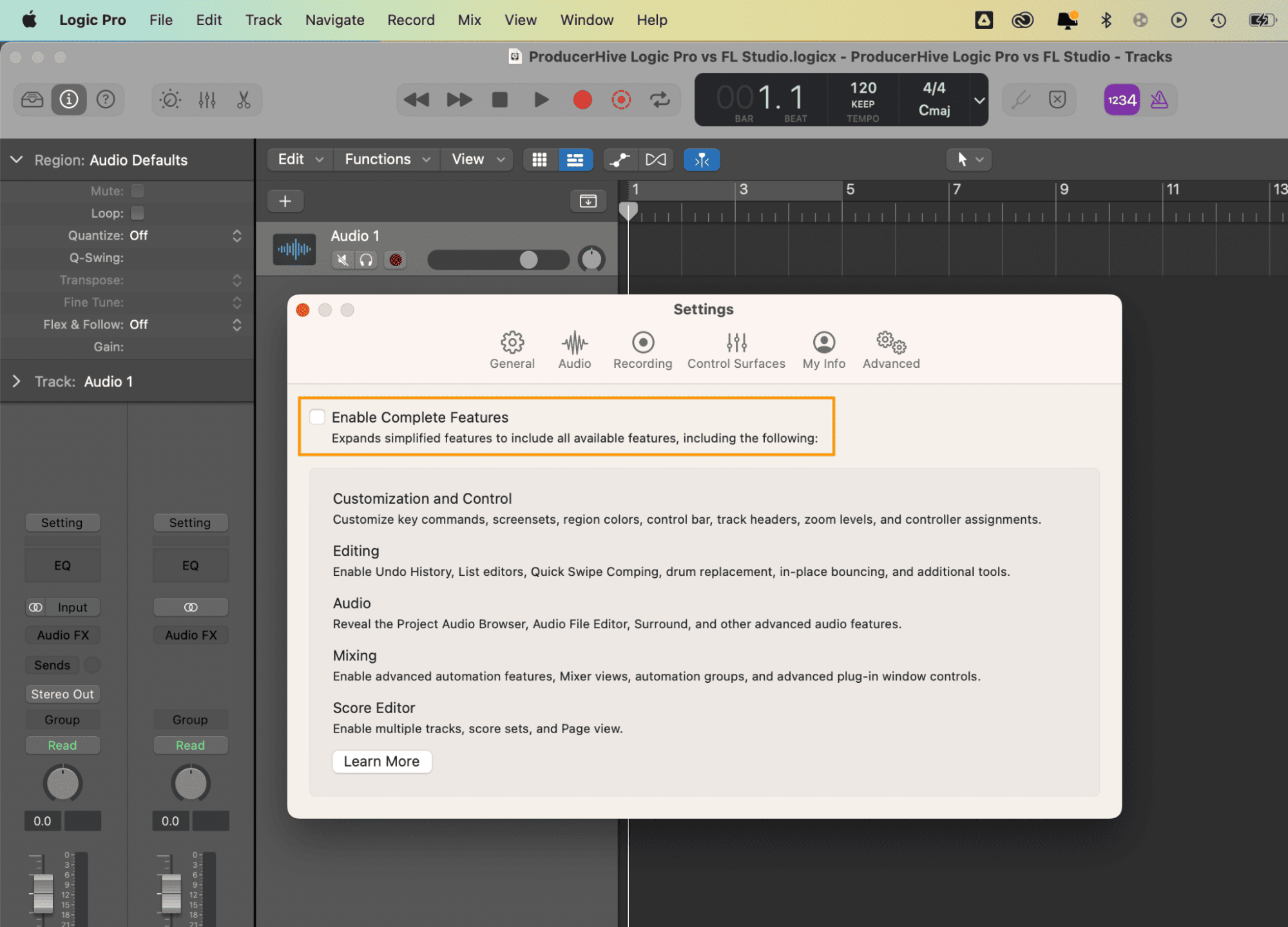
Logic Pro loads up in ‘Simple Mode’ by default. It’s a simple and decluttered layout, with few buttons that may confuse beginners or producers unfamiliar with this DAW. The ability to access fantastic MIDI instrument sounds, creative plugins, and audio processing is still there, even in ‘Simple Mode.’
Using this mode, you only omit the more specialist features like color-coding your instrument tracks and drawing in more detailed instrument/track automation. In some ways, this makes it more straightforward to load your MIDI instruments, loops, or recorded audio and get cracking with making your music!
To toggle between ‘Simple Mode’ and ‘Complete Features,’ simply navigate to the Apple toolbar at the top of the screen: Logic Pro > Settings > Advanced > tick/untick ‘Enable Complete Features.’
FL Studio

Although the newcomer to
This access bar shows you every single feature and sub-window that you could possibly choose to load up, which makes it super easy to switch between project tasks or go from one to the next.
FL Studio stores most of its MIDI Instrument sounds as Plugins, so if you’re planning on making a banging Dance track from the off, just click ‘Plugin Database’ or ‘Plugin Presets’ if you want to be offered a selection of pre-prepared instrument sounds.
The ‘Channel Presets’ and ‘Mixer Presets’ sidebar headers are also handy for mixing your project.
Some fantastic sounds are on offer, including booming kick drums and fizzy analog synth patches. Once you’re done choosing your sound, you can easily drop some notes in on the Piano Roll (accessed by double-clicking a segment of audio on the main Arrangement window) – and boom, you’re off!
GUI (Graphic User Interface)
Logic Pro
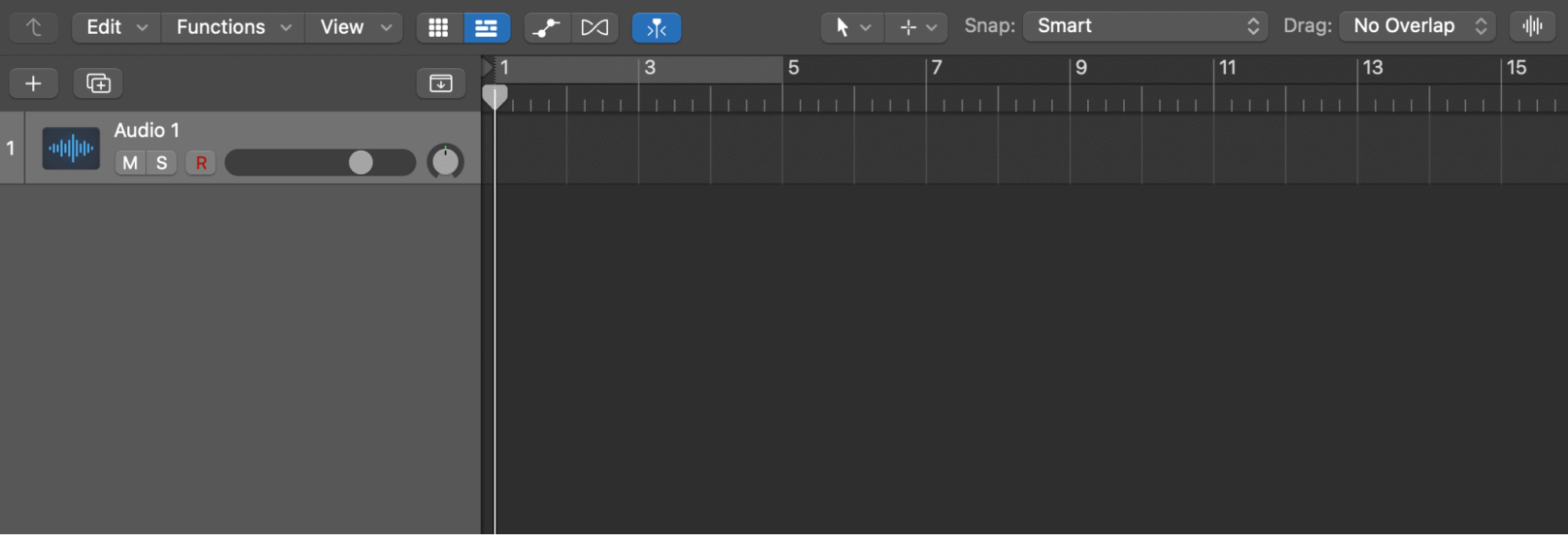
Logic Pro sports a near-flawless GUI design, with a sense of evenness and cleanliness that Apple has pretty much made their stylistic trademark.
The overhead Section Marker, Beat Ruler, and Looper functions can be neatly utilized on top of the main ‘Audio Roll’ (the bar-by-bar section found to the right of each Audio/MIDI track), where you can drag & drop, record, or sequence your sounds.
You’ll find it easy to name your track, give it a pleasing icon, and organize your groups of tracks into ‘Summing Stacks,’ which save CPU usage and tie the location of chosen instrument tracks together for ease of accessibility.
Also, if you’re ever stuck, just click the ‘?’ button in the top-right corner of the upper-hand control bar (the big light gray section just below your Apple toolbar). By pressing this, some handy hints are available, which show you the function and purpose of every feature inside the software.
Having said all this, the only downside to
FL Studio
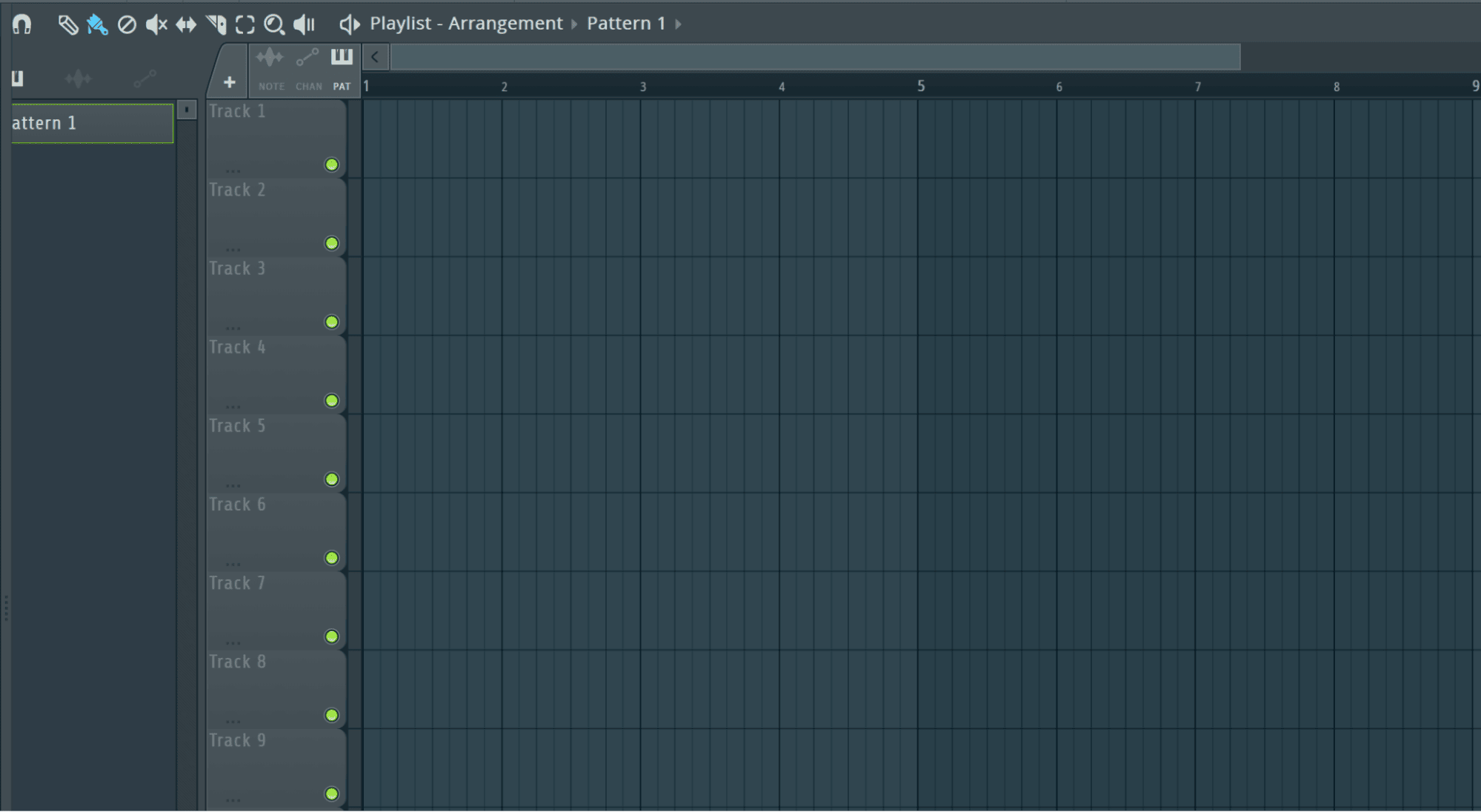
FL Studio, on the other hand, can seem a little more cryptic in how and where everything is stored. Although all its features are (eventually) possible to locate, the GUI doesn’t sport many obvious features upon its first load-up.
You might find it frustrating on your first try because you don’t get much of a look into where everything is or even how to start creating audio. Unlike
To start creating music segments with these instrument tracks, you’ll have to hold down your mouse (left-click) on an empty space in the audio roll interface, then drag the generated audio segment to as long as you want the section or loop. You can then apply sound-sculpting Plugins from the access bar on the side.
It’s a little bit of a wonky process to begin making music in
It’s a shame because we consider this tiered pricing gate (with the privilege of audio treatment behind it) to be a really limiting factor for those genuinely interested in making professional-standard music but can’t afford to shell out $520 on demand.
Creative Tools
Logic Pro
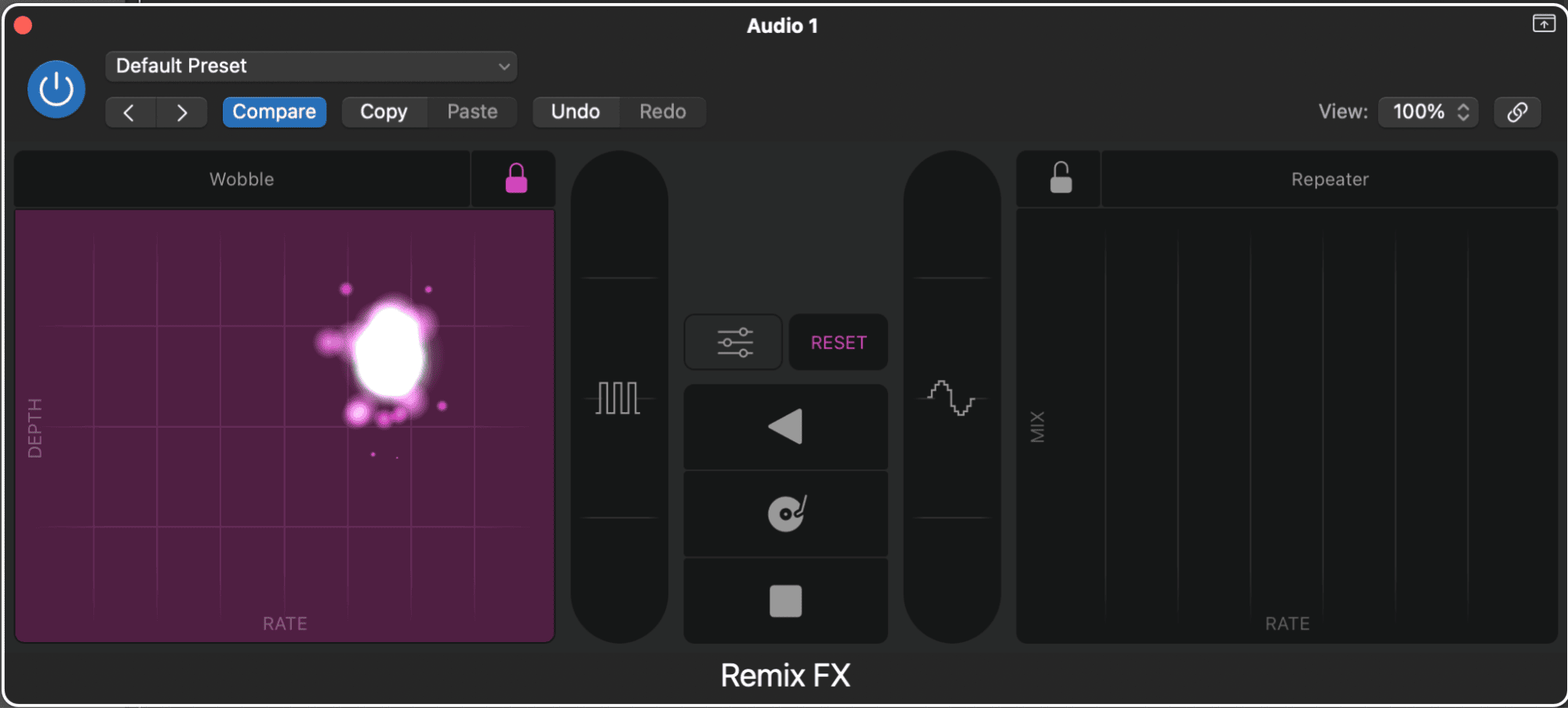
Logic Pro offers some great inclusive plugins and tools for creative MIDI/audio manipulation. For example, the ‘Remix FX’ plugin is accessed under ‘Multi Effects’ in the drop-down plugin menu (above the left-hand information bar of any track).
We consider the ‘Remix FX’ plugin to be especially interesting – and it’s highly rewarding when designing wobbly spatial effects. The resulting effects can be targeted towards individual instrument tracks, groups, and even FX bus tracks, making it an incredibly versatile piece of virtual equipment.
It’s easy to create automated motion with Remix FX by setting your instrument track’s mode to ‘Touch’ on the drop-down automation menu (below the volume fader on the left-hand information bar of any track).
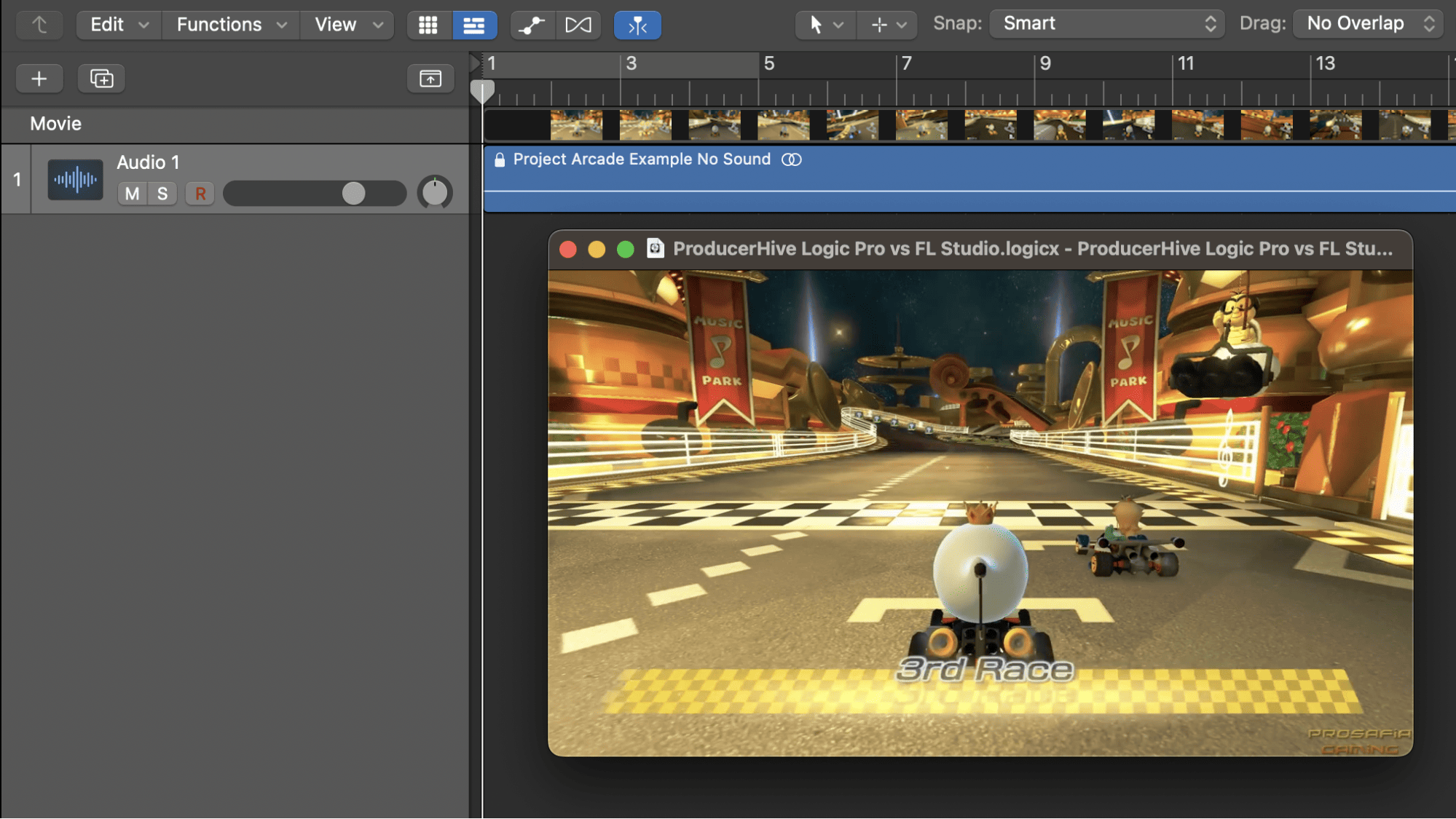
Let the track play – then hold your mouse down and move it across various positions on the provided automation pads. Make sure to set the instrument track’s mode to ‘Read’ before listening back, or else you’ll overwrite your changes!
Another handy creative tool offered by default in all versions of
If you’re scoring a film, TV series, or segment of a video game and want to load a specific piece of footage into your Logic project, then all you have to do is navigate to your Apple toolbar: File > Movie > Open Movie > search for your desired video clip. Unfortunately,
FL Studio hits a plateau regarding extended forms of music-making, such as creating soundtracks for visual media. It can allow you to use some brilliant sounds and create multi-layered (mainly electronic) compositions, but it can’t load a video or give you live-time control over subtle FX changes as
FL Studio
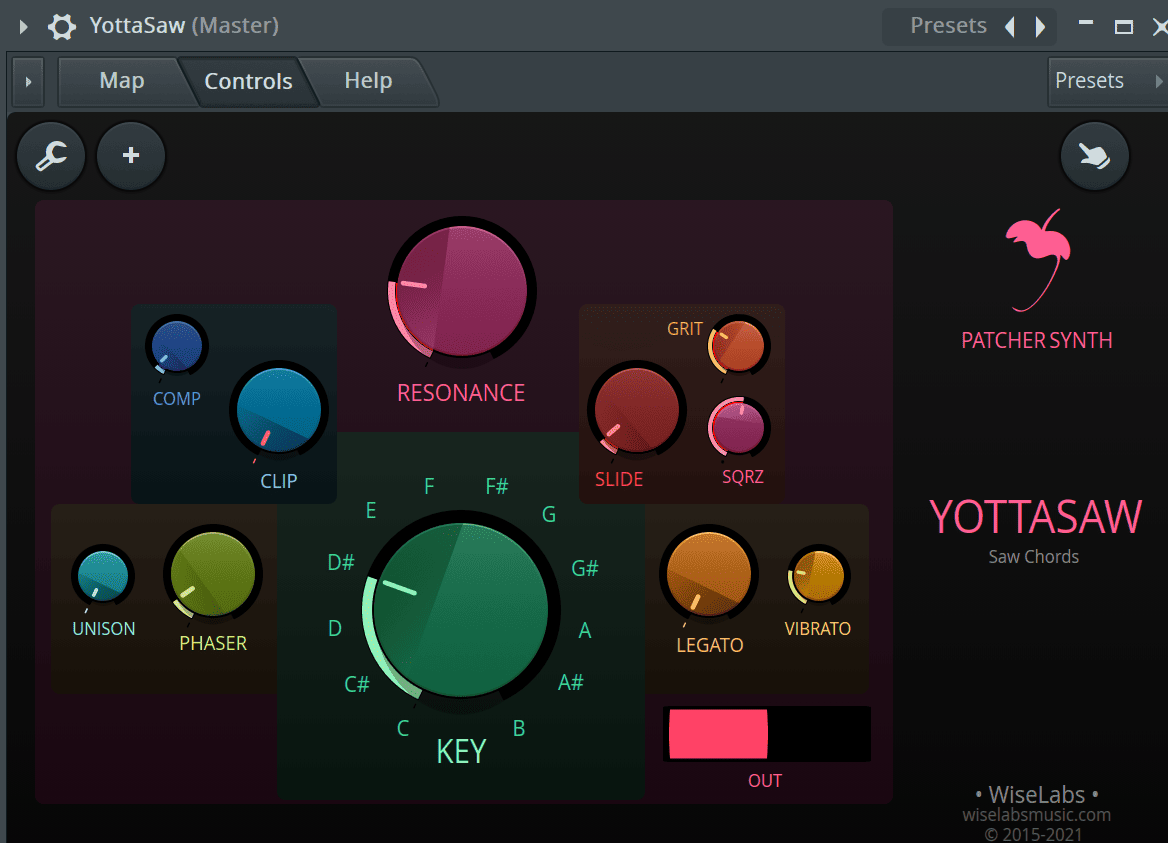
To be fair to
For example, if you’re after that signature, highly-professional Daft Punk sound, or you just want to innovate your own electronic bona fide, there are hundreds of suitable plugins to choose from – and they all come with
I highly recommend loading up ‘YottaSaw,’ which is part of the ‘Plugin Presets’ menu on the left-hand access bar (Plugin Presets > Generators > Patcher > X Wiselab > YottaSaw). It’s a nifty sawtooth generator VST plugin with many great additional functions that can enhance the fundamental sound of the synth. The ‘Grit’ and ‘SQRZ’ dials can really crank your synth tone up a notch!
However, with all these great MIDI-generating plugins and high-end electronic sounds, there is a fair drawback to using
Compatibility
Logic Pro
If you’re a PC user (Windows OS), you’ll find yourself with no option of getting
It’s only compatible with Mac OS and can even be purchased inclusively with a new MacBook – arriving with a complementary guarantee of free updates and upgraded versions for 2 years. Unfortunately, Apple has yet to release
FL Studio
This is one factor that makes
You’ll also find it easy to transfer
You don’t need to change any formatting to open the same
Cost
Logic Pro
Logic Pro is purchased in the Apple store under ‘Applications’ and costs around $200 USD. One of the most outstanding inclusive facilities you’re getting for $200 – besides the highly powerful music-making engine itself – is
The Apple Loops library is home to literally thousands of loopable musical elements featuring solo instrument passages, riffs, vocals, drum beats, bass lines, synth patterns, and more. You can use Apple Loops as freely as you like in your compositions (without worrying about paying anybody royalties).
Overall, I think the $200 asking price is pretty reasonable, considering the wide variety and depth of music-making facilities you can access instantly.

FL Studio
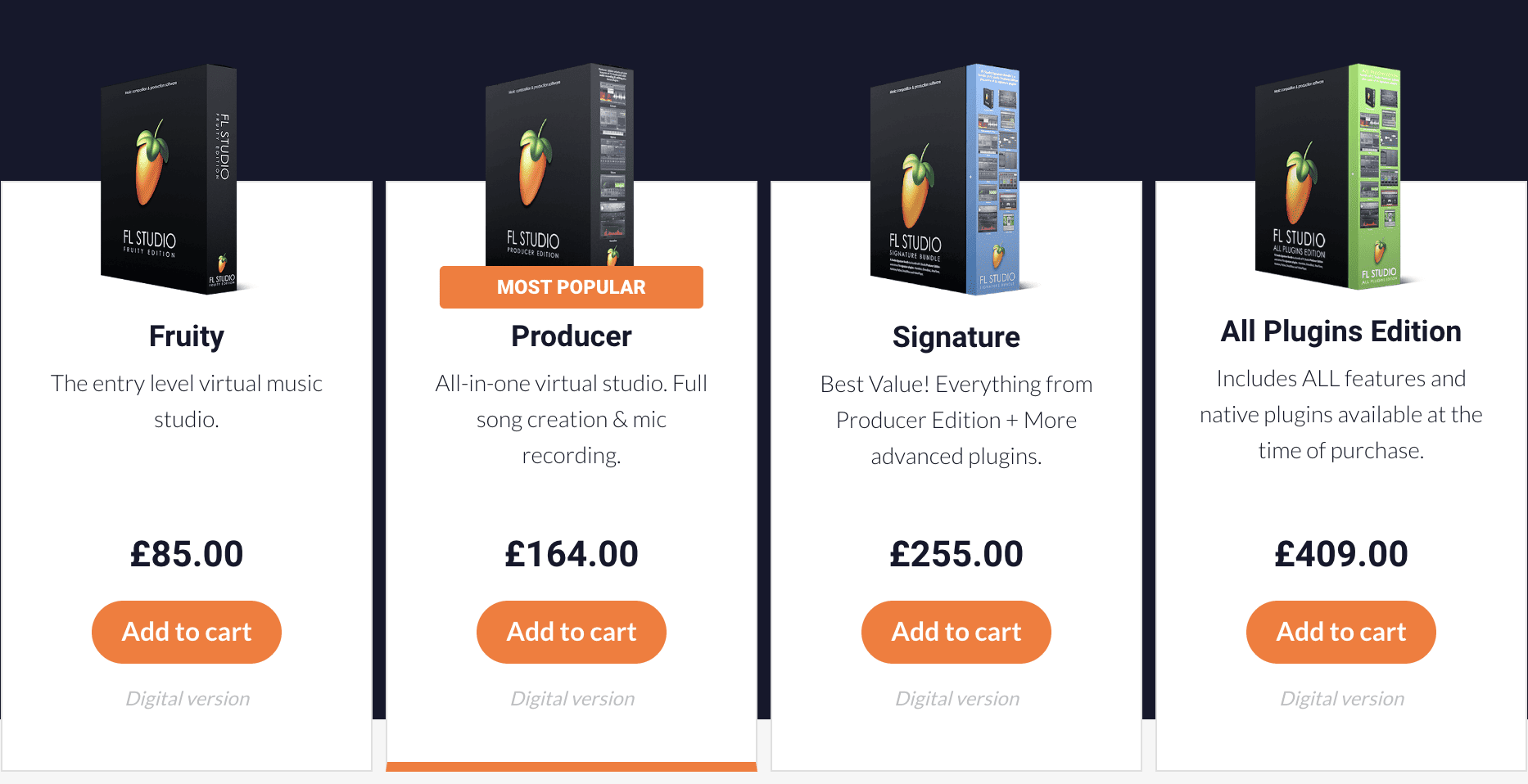
FL Studio offers a tiered pricing system depending on the variety and depth of music-making features you can access.
This tiered pricing system ranges all the way from
The FruityLoops website includes in-depth descriptions and video tutorials for each version of
Also, you’ll probably find this tiered pricing to be a pretty useful gradient if you’re a developing musician or studying music production at college: if you’re ever in a position where you want to upgrade your tier of
I think the $520 USD asking price for the All Plugins Edition is a little extreme. It’s more than double the price of
Besides this, the Free Trial version already has a very expansive range of instruments and VST patches – not to mention it’s a time-unlimited trial. You could almost benefit most from simply downloading the
Updates
Logic Pro
If you haven’t purchased
Apple will offer some same-version updates to
This is most likely the only ‘price-catch’ with
FL Studio
Infinite, limitless version updates – for free.
Processing
Logic Pro
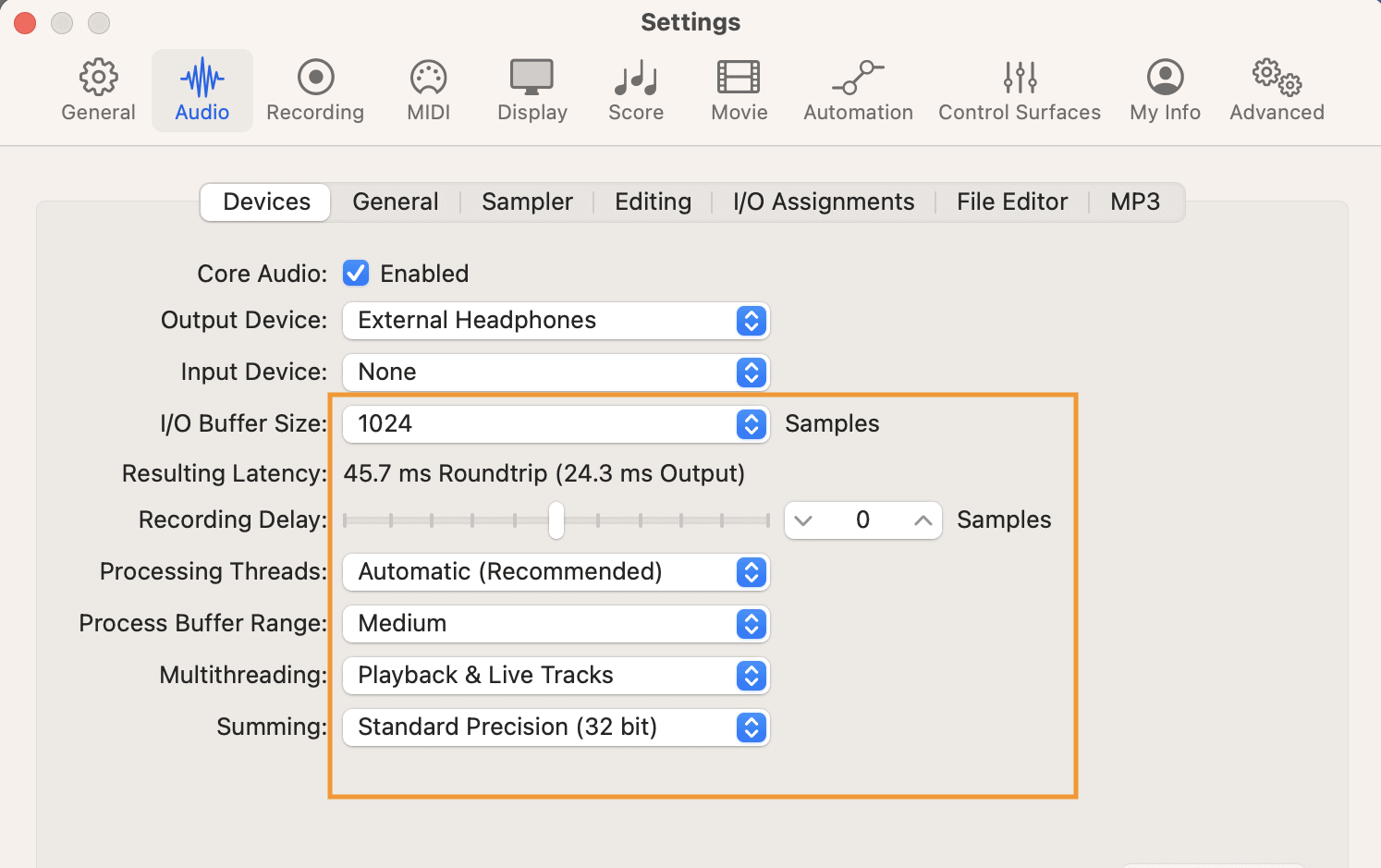
Logic Pro has a fantastic range of efficiency tools available for saving CPU usage. If your machine is a little aging or lacking computer power overall, simply navigate to the Apple toolbar at the top of the screen: Logic Pro > Settings > Audio.
Here, you’ll find drop-down menus for toggle functions such as ‘I/O Buffer Size,’ ‘Recording Delay,’ ‘Processing Threads,’ ‘Process Buffer Range,’ ‘Multithreading,’ and ‘Summing.’ You can tweak these to their smallest possible sizes and change the Multithreading to ‘Playback Tracks’ to save a lot of CPU power!
However, you might find that you’re pretty much unable to record live audio when you’re in optimal ‘low-CPU mode’ because it takes a fair amount of computer power to combat latency (unwanted delay time between your instrument/mic and your music-making software).
There’ll be seconds of latency if you switch every CPU-related function to its most efficient setting – making live playing or singing pretty much impossible to record – so it’s really a case of finding the setup that works for you, depending on what you’re doing within
FL Studio
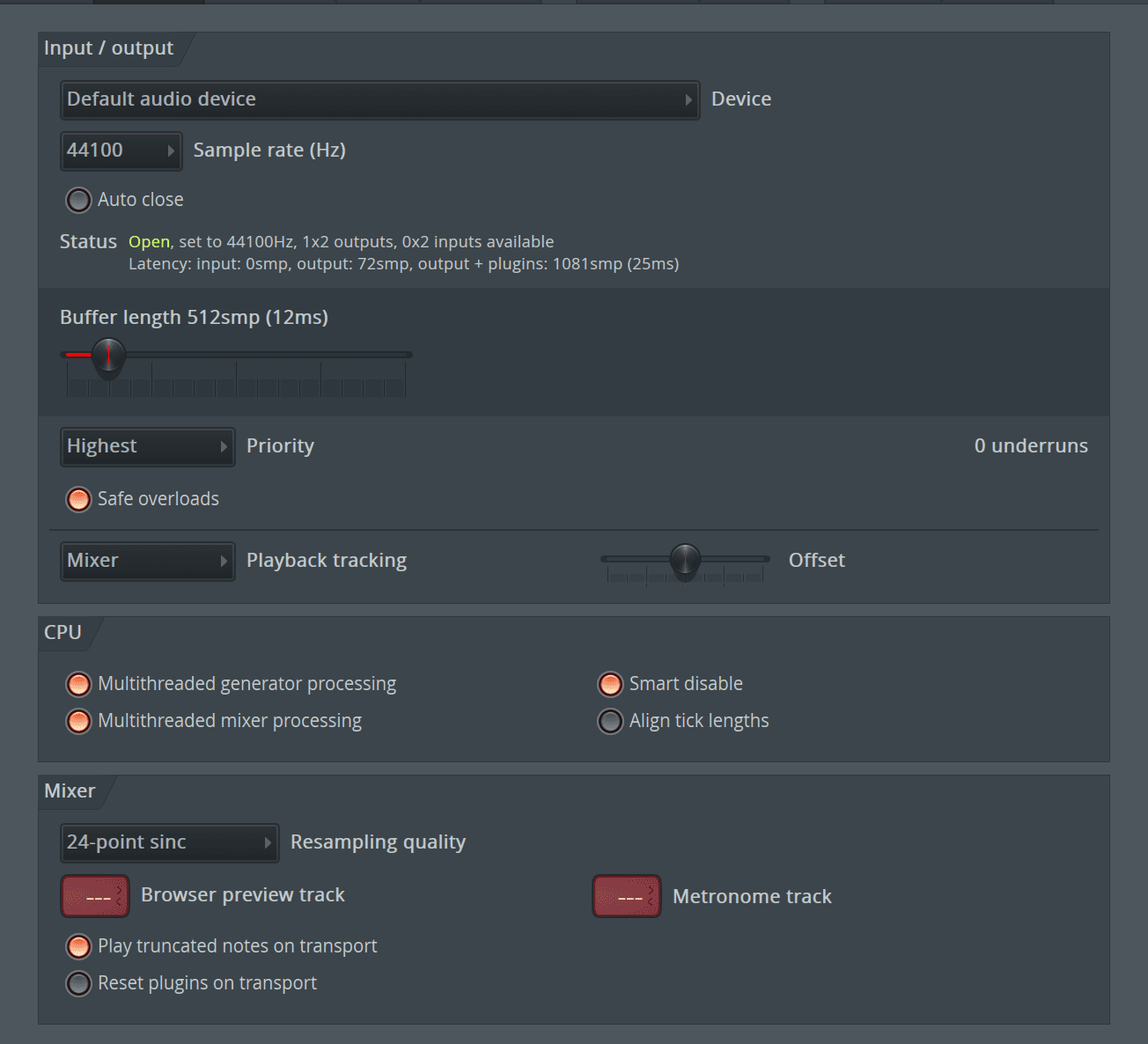
FL Studio offers more or less the same range of efficiency tools as
Some of the features are quite handy, such as ‘Safe Overloads,’ which gives you the option of ramping up the volume of your instrument tracks without having to worry about the possibility of deafening yourself or unpleasantly distorting the sound of your composition. Still, sensible mixing strategies are probably the best way to get around that…
Also, check out our post on fixing crackling issues in FL Studio.
Track Limit
Logic Pro
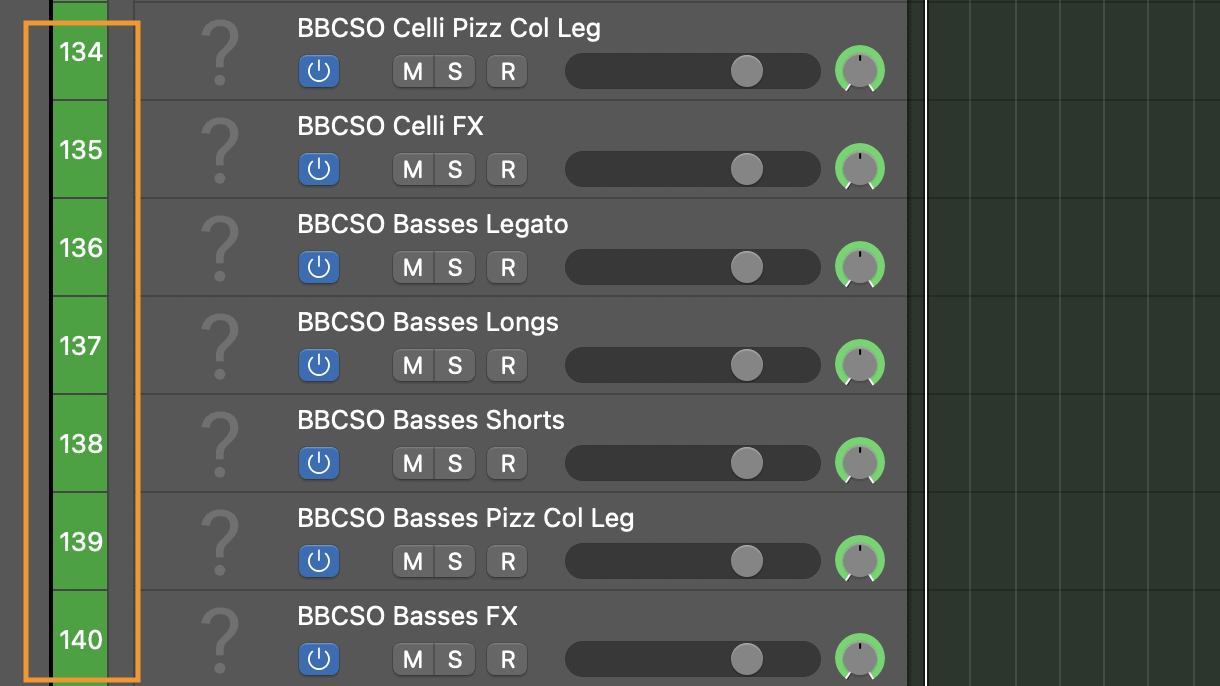
Logic Pro can work with up to a whopping 1,000 MIDI or audio tracks at once per project, which is massive!
However, when it comes to filling each track up with live automation and MIDI information, you’ll probably find the CPU starts to hiccup and reach its cap at around 500 active tracks. This still isn’t bad by any stretch of the imagination.
FL Studio

FL Studio caps its track limit at 500 instrument tracks per project – and you’ll find the CPU begins to get shaky after about 100 of them are actively used. I think this a pretty poor turn-up – especially given the borderline-extortionate asking price of the highest tier version, where this track limit is still maintained.
Wrapping Up
With
Logic Pro provides less richness in the way of EDM synths and drum patterns but outshines FL regarding versatility and different music-making methods. You can set up pretty much any music-related project in
You shouldn’t work with audio files in
Logic Pro, on the other hand, is strongest as a tool for organizing and manipulating live audio. Sure, you can generate your musical parts from MIDI – but be sure to bounce it all to audio sooner rather than later. The way
So, which one will have the final say –
New to music producing and unsure where to start? Check out our guide here.