- Streaming services have revolutionized how we listen to music
- YouTube Music and Spotify are the two biggest music streaming platforms
- Find out which platform is best for you
Both YouTube Music and Spotify offer free access to their entire song libraries, but each comes with limitations that quickly become annoying (not to mention the barrage of annoying ads!)
If you decide to upgrade to a paid subscription model, you are probably wondering which one you should go for.
Let’s look at the features of both and which music streaming platform is best for you.
YouTube Music vs. Spotify – Which Is Best?
For the vast majority of music lovers, Spotify is more likely to be the better option when compared to YouTube music.
If you want the best in music, podcasts, and all things in audio-related entertainment, Spotify simply has more to offer, at least for now it has. Plus, it has the bonus of higher-quality audio too.
But don’t discard YouTube Music just yet! YouTube Music will be a better fit for you if you use an Android phone or are tied into the Google ecosystem of apps and services.
If budget is a concern, YouTube Music offers a much better free service.
Most serious music fans, however, would vote for Spotify every time, as Spotify frequently adds fresh discovery and personalized playlist features to enhance your enjoyment of streaming music.
What Is Spotify?
Spotify was the brainchild of Swedish entrepreneurs Daniel Ek and Martin Lorentzon, which debuted in Europe in 2008 and quickly reached its first million subscribers in 2011.
As of February 2022, the Spotify app was available in 184 countries and had as many as 500 million users per month.
Globally, Spotify is the most popular streaming service (although in the US, Apple Music comes out on top, closely followed by Spotify).
Even my Grandmother has a Spotify account. That’s how ingrained in our culture Spotify is as a music service!
There’s a Spotify app available for Windows, Mac, Linux, iPhone, iPad, Android devices, and Kindle.
You can also use the Spotify web player in your browser, and many smart TVs even come with a Spotify app integrated into their setup.
What Is YouTube Music?
YouTube Music, by comparison, is the new kid on the block. Although YouTube seems to have been around since the beginning of time (well, 2005, to be precise…it just seems longer), YouTube Music wasn’t launched until 2014.
Newly owned by Google, it was primarily designed as a complimentary video streaming service to the now-defunct Google Play Music service.
Originally known as YouTube Music Key, the service has undergone several rebrandings before finally settling on the name YouTube Music in 2018.
Even today, some more casual YouTube users aren’t aware of its existence and still think of YouTube as purely a video-playing platform.
Spotify vs YouTube Music Comparisons
Let’s look in more depth at the features both offer, both paid and non-paid.
The “Free” Plan Comparison
|
Features |
YouTube Music Free Plan |
Spotify Free Plan |
|
Access to Entire Library |
Yes |
Yes |
|
Ad Skips |
Yes (after 5 seconds) |
No |
|
Background Play |
Web player only |
All platforms |
|
Song Skips |
Unlimited |
Max of 6 songs/hour |
|
On-demand Playback |
All platforms |
Desktop and web player only |
|
Offline Streaming |
No download option for songs or videos |
No download for songs |
|
Playback Modes |
Song and video mode |
No video mode |
|
Number of audio settings for desktop app |
2 settings: Low (48 kbps) Normal (128 kbps) |
4 settings: Automatic (dependent on internet speed) Low (24 kbps) Normal (96 kbps) High (160 kbps) |
|
Number of audio settings for mobile devices |
2 settings: Low (48 kbps) Normal (128kbps) |
4 settings: Automatic (dependent on internet speed) Low (24 kbps) Normal (96 kbps) High (160 kbps) |
|
Highest audio streaming quality |
128 kbps |
160 kbps |
Both Spotify and YouTube Music operate on what is known as a freemium business model.
This means they offer free plans for allowing users to stream digital music with ads, but there is also an option to upgrade to a Premium account.
The major trade-offs for using either Spotify or YouTube Music for free are the occasional ads between tracks (not occasional enough!) and the inability to download tracks for listening offline.
YouTube Music seems to offer the best options for streaming music without a charge. With YouTube Music, you can skip an ad after five seconds and skip as many songs as you like.
With Spotify, however, you can’t skip the ads at all, and Spotify only allows you to skip six songs every hour.
Neither YouTube Music nor Spotify, when free, allow you to download songs.
Still, YouTube Music does offer more flexibility in how you listen to songs, including playlists, shuffle mode, and sending songs to a queue. By comparison, Spotify limits the playback to a specific playlist only.
Audio quality is more limited on YouTube Music, which is capped at 128 kbps compared to the slightly higher 160 kbps of Spotify on a compatible mobile device.
Spotify offers more flexibility in audio quality settings with the lowest rate of 24 kbps, ideal for those worried about data usage when on mobile plans.
The other area where Spotify shines on the free subscription plan is the ability to playback Spotify tracks in the background on any device.
YouTube Music only allows playback when the app screen is open. Not a problem when using it on a desktop in a browser ( you can simply have other tabs open), but can be an issue when using a mobile app and severely impact your device’s battery life.
Winner: YouTube Music
Pricing and Plans
There will no doubt come a time when you want to get rid of those annoying ads and enjoy the extra features and higher audio quality of a premium subscription to YouTube Music or Spotify. Here there’s not much to choose between the two.
YouTube Music Premium costs $9.99 monthly and offers ad-free listening, offline playback, and background playback. The service also offers a monthly family plan for up to six members for $14.99.
Spotify Premium costs $9.99 monthly and offers ad-free listening, offline playback, and higher-quality audio streams.
The Family Plan for Spotify Premium may be a dollar more monthly at $15.99, but they offer a duo membership for just two people living at the same address.
|
Pricing Plan |
YouTube Music |
Spotify |
|
Individual |
$9.99/month |
$9.99/month |
|
Student |
$4.99/month |
$9.99 |
|
Family (up to 6 people) |
$14.99/month |
$15.99/month |
|
Duo (2 people) |
N/A |
$12.99/month |
|
Annual |
$99/year |
N/A * |
Although officially, there is no annual subscription offer available via the Spotify Premium sign-up page; there are Spotify Premium annual subscription gift cards for $99 available either via online retailers such as Amazon or in physical forms from many high street retailers.
Nothing stops you from “gifting” yourself an Annual Spotify Premium subscription and using the code to sign up online.
Winner: Draw
Bonus Streaming Services Access
Unlike the family plan of YouTube Music, Spotify Premium’s Family plan also offers subscribers access to Spotify Kids.
In addition, if a student should sign up to the Spotify Student premium plan, they also get access to video-on-demand streaming services Hulu and SHOWTIME.
YouTube offers a similar perk through their regular YouTube Premium plan, which gives subscribers automatic access to YouTube Music Premium and YouTube Originals – three on-demand streaming services all in one.
Winner: Spotify
User Interface
One of the most critical factors when choosing a music streaming service is the user interface. A good user interface should be intuitive, easy to navigate, and visually appealing.
Regarding the user interface, both YouTube Music and Spotify are relatively similar, with clean and straightforward designs that are easy-to-use.

YouTube Music’s interface is centered around the search bar, making it easy to quickly find the songs, albums, or artists you’re looking for.
The app has a “Home” tab, which provides recommendations based on your listening history, and a “Library” tab, where you can find your saved playlists, albums, and songs.
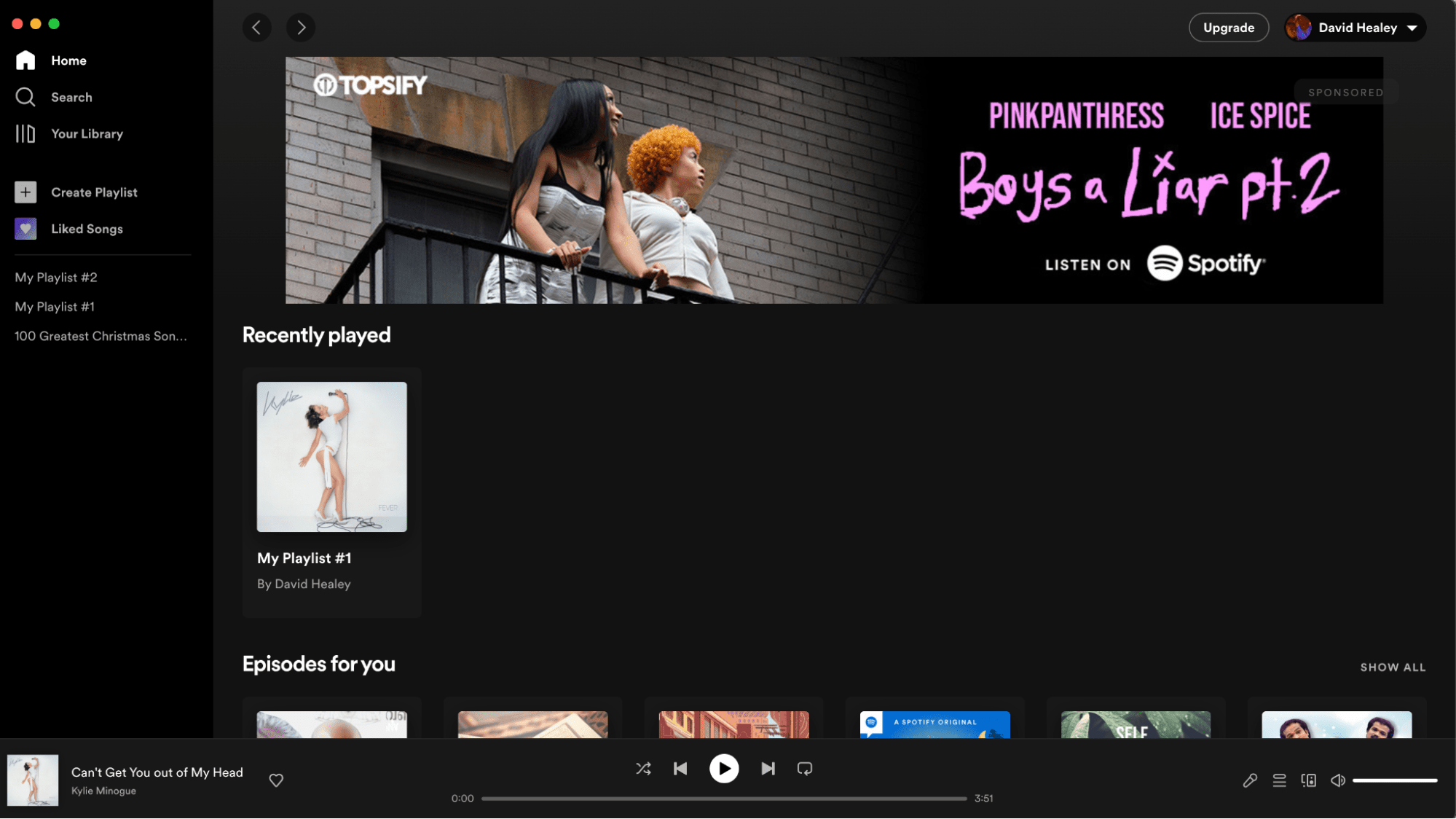
On the other hand, Spotify’s interface is divided into five sections: Home, Search, Your Library, Premium, and Settings.
The Home tab displays personalized playlists, new music releases, and recommendations based on your listening history.
While both interfaces are easy to navigate, Spotify’s interface is slightly more comprehensive, offering more features and options to customize your listening experience.
Winner: Spotify
Music Selection
Another essential factor when choosing a music streaming service is the music selection. Both YouTube Music and Spotify have a strong core of mainstream music from pop to rock, hip hop to rap, and house to techno.
Still, Spotify tends to do better with lots of original indie music from relatively unknown (yet) artists.
Spotify boasts on its website they have over 100 million tracks and 5 million podcast titles to share, with as many as 60,000 additions every day.
By comparison, YouTube Music had accumulated over 70 million official music releases by February 2021.
These figures don’t account for the quirky remixes, mash-ups, and mixtapes that YouTube subscribers can upload. For example, search for Kiss by Prince on Spotify, and you will probably just get the original audio track.
Search for Kiss by Prince on YouTube Music, and you will no doubt find a few quirky remixes, a cover or two, a live performance, an instrumental, and even the official music video.
The main advantage that YouTube Music has over Spotify is its extensive library of music videos. YouTube Music offers access to millions of official music videos, live performances, and covers.
In contrast, Spotify only offers audio tracks, with no option to watch music videos.
In terms of exclusive content, both services offer exclusive albums, singles, and playlists, but YouTube Music also has the upper hand in this area.
YouTube Music offers exclusive access to live performances, concert footage, and behind-the-scenes content that you won’t find anywhere else.
One feature that Spotify offers that YouTube Music has yet to catch up with is podcasts.
With an impressive collection of over 5 million podcasts, Spotify hosts such luminaries as Michelle Obama and the official podcast of Harry and Meghan (the Duke and Duchess of Sussex).
The expansion of the podcast section of Spotify is largely responsible for Spotify’s recent growth Spotify is now the number one platform used for listening to podcasts beating off even Apple.
Winner: YouTube (for the videos), Spotify (for music and podcasts)
Audio Quality
Neither Spotify nor YouTube Music currently wins the award for best-sounding music streaming service.
Other streaming services like Tidal, Apple Music, and Amazon Music Unlimited are already offering hi-res and lossless music.
Regarding the highest bitrate, Tidal currently leads the pack with neither Spotify Premium nor YouTube Music Premium ranking highly.
That’s not to say the audio quality is bad, though. Technically Spotify Premium has a higher bitrate with streams up to 320 kbps, while YouTube Music is currently restricted to a maximum bitrate of 256 kbps.
The difference, however, is not too likely to be audible unless you have top-notch hi-fi, and can also depend on your connection speed.
Spotify has recently announced a higher level of audio quality for a different tier of Spotify Premium, known as Spotify Hi-Fi, but has been quite tight-lipped about when exactly this top tier may be launched.
Winner: Spotify
Social Features
Music streaming services have evolved beyond just listening to music; they have become social platforms that allow users to share their music preferences with friends and family.
YouTube Music and Spotify offer social features allowing users to share their favorite songs, playlists, and artists with others.
YouTube Music allows users to share music directly from the app to other social media platforms like Twitter, Facebook, and Instagram.
The app also has a feature called “Collaborate on a playlist,” where users can create a playlist and invite friends to add their favorite songs to it.
On the other hand, Spotify has a more extensive social feature set, with features like “Friend Activity,” which shows what your friends are listening to in real time, and the ability to follow and share playlists created by other users.
Spotify also offers a collaborative playlist feature, allowing users to create and share playlists with friends and family.
Overall, Spotify has more robust social features, making it the preferred choice for users who prioritize social sharing and discovery.
Winner: Spotify
Music Discovery and Recommendation Algorithms
I remember being taken aback when Apple introduced the Genius feature to iTunes, which enabled it to make a whole playlist of similar songs in your library from just picking one or two tracks.
One Stevie Wonder track could kick up a soulful mix for the rest of the afternoon.
Artificial Intelligence means track recommendation algorithms have come a long way since those early days.
Now instead of choosing just tracks analyzed from your library, the recommendation playlists have access to 100 million tracks or more.
Both YouTube Music and Spotify use advanced algorithms to provide users with personalized recommendations.
YouTube Music’s recommendation algorithm is centered around the “My Mixtape” feature, which creates a personalized playlist of songs based on your listening history.
The app also provides personalized recommendations based on your favorite songs and artists.
Spotify’s recommendation algorithm is centered around its “Discover Weekly” feature, which creates a personalized playlist of new music for each user every week.
Additionally, the app provides personalized recommendations based on your listening history, similar to YouTube Music.
While both services provide excellent personalized recommendations, Spotify’s recommendation algorithm is more comprehensive and accurate, making it the preferred choice for users who prioritize music discovery.
Winner: Spotify
Youtube Music vs Spotify: Who Pays Out the Most Royalties to Artists?
An important consideration when choosing a music streaming service is who is going to pay out the most money per stream. Maybe you are a concerned music fan who wants to ensure your favorite artists receive their fair shares of royalties or more importantly you are an artist wondering which platform will give you the most money.
Obviously, streaming will never have the same high payouts of somebody physically purchasing your music but at least it’s not piracy where nobody gets a payout!
Both Youtube Music and Spotify are at the lower end of the payout spectrum with Spotify paying $0.0033 per stream in 2022 and Youtube even lower at $0.002.
Spotify explains its lower-than-average payout with the free tiers, which are often included and streaming in countries where lower subscription prices are available.
However, Youtube generally pays out more to artists as they allow for additional income from monetizing tracks through in-app advertising.
Streams from paid-for YouTube Music accounts automatically generate royalties but those free streams on YouTube don’t generate any royalties. Instead, you can share in the money raised from in-video ad placement. YouTube ads typically generate $7 – $10 for every 1000 impressions, which isn’t something to be sniffed at.
With in-app ads and micro-sync licenses when another creator uses your track on YouTube video, the payout bumps up to an average of $0.008 per stream. Still not as high as premium services like TIDAL or Qobuz but higher than Spotify. (Only 125,000 streams are needed to make $1000 compared to the 303,030 on Spotify).
Winner: Youtube Music
Wrapping Up
For most music lovers, Spotify is the better option when choosing a digital music streaming service.
YouTube Music may offer videos and lack the podcasts of Spotify, but if you are talking about music content, Spotify is hard to beat.
Spotify’s library of diverse genres and well-curated weekly playlists will please even the most discerning music fans.
While YouTube Music has the upper hand in music videos and exclusive content, Spotify has more robust social features, a better recommendation algorithm, and higher-quality audio streams for premium subscribers.
Ultimately, the choice between Youtube Music and Spotify comes from personal preferences and priorities.
If you prefer watching music videos and exclusive content, YouTube Music may be the better choice. However, if you prioritize social sharing, music discovery, and higher-quality audio streams, Spotify will be preferred.
FAQs
Can You DJ With Spotify Premium or YouTube Music?
Officially no. Spotify recently withdrew Spotify integration from all third-party produced DJ apps, and licensing issues prevent any of the tracks downloaded for offline listening from being used.
YouTube was never supported in the first place.
There are some unofficial workarounds whereby you can use another app to download the track from either YouTube or Spotify, although the legality of this practice is questionable.
Use YouTube or Spotify to discover the music, then find a legitimate source to add it to your music collection.
Can You Move Your Spotify Playlist to YouTube Music?
If you should consider the swap from Spotify to YouTube Music, don’t worry, you don’t have to leave all your playlist behind.
A few FREE services make transferring your playlist over, even to the free YouTube Music app, relatively easy.
Playlist Buddy is one such app that allows you to transfer playlists easily, with the only limitations being a playlist can’t contain more than 250 songs and you can’t transfer more than 10 playlists a day (a Google restriction).
After logging into the Playlist Buddy website with your Spotify credentials, it will list all your Spotify playlists. After selecting the one you wish to convert to YouTube, it will ask for your YouTube credentials to transfer the list.
However, although Playlist Buddy will let you know whether all the tracks were transferred, it won’t tell you which tracks didn’t make it.
Can You Move a Spotify Playlist Over to Tidal?
For DJs, transferring a Spotify playlist over to Tidal is more useful, as Tidal is integrated into many DJ software, including Serato and Virtual DJ.
You must connect your Tidal and Spotify accounts with an app like Soundiiz before selecting the playlists you want to transfer over.
Again due to Tidal having a different library of songs, you may find some tracks on your playlist that don’t quite make the leap.
Still, Tidal’s collection is forever growing, plus it has the benefits of some of the highest bitrates of any streaming service.
Tidal vs Spotify – the great streaming debate. We break down 3 reasons to switch over!