

- Learn how to pair JBL speakers with multiple devices
- Troubleshoot a variety of connection issues
- Learn how to reset your JBL speakers and devices
- We also have a separate guide to connecting multiple JBL speakers
In this article, we’ll demonstrate how to connect JBL speakers to various devices and provide troubleshooting tips.
The following devices are covered:
💡QUICK ANSWER: To pair your JBL speakers, follow these steps:
- Activate Bluetooth on your device.
- Press the Bluetooth button on the speaker.
- Select the speaker from the list of available devices on your device’s Bluetooth settings.
How To Put JBL Speakers In Pairing Mode
It’s worth noting that many JBL speakers will automatically enter pairing mode on powering up. You must ensure your speakers are in pairing mode to connect speakers to any of your devices. To do this manually, follow these two steps:
- Press the Power Button to turn on your JBL speaker.

- Press the Bluetooth button.


💡 A blinking light will indicate pairing mode. If your speaker was not previously connected to a device, it may power on already in pairing mode.
Similarly, it should automatically reconnect if it was previously connected to the device (provided it is in range with Bluetooth enabled).
How To Pair JBL Speakers
To iPhone
Connecting takes a few simple steps. Here’s how to connect JBL speakers to iPhone:
- Open the Settings app on your iPhone and select the Bluetooth menu.
- Locate your speakers in the list and tap to connect.
Ensure the connection has been completed successfully by playing some audio.


To Android
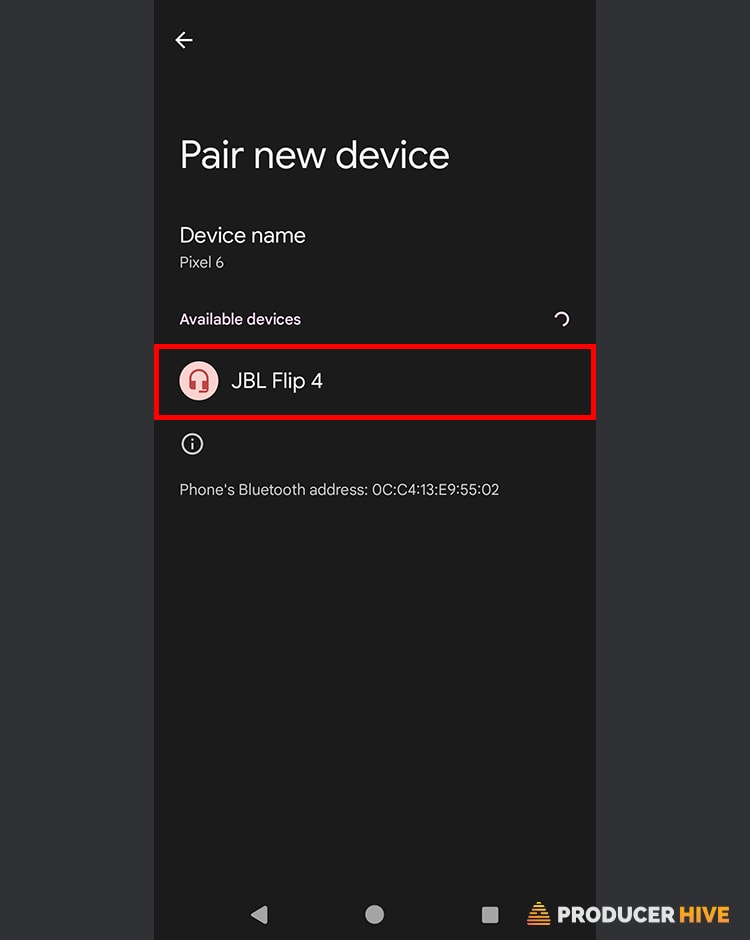
If you’re an Android phone user and wondering how to pair speakers to your device, here’s how:
- Ensure your speakers are in pairing mode and open your Android device’s Settings menu.
- Select Connected Devices.
- Select Pair New Device.
- Select your speaker under Available Devices.
- Your JBL speaker will appear on the Connected Devices menu under Media Devices. Perform a quick test by listening to some audio.


To Mac
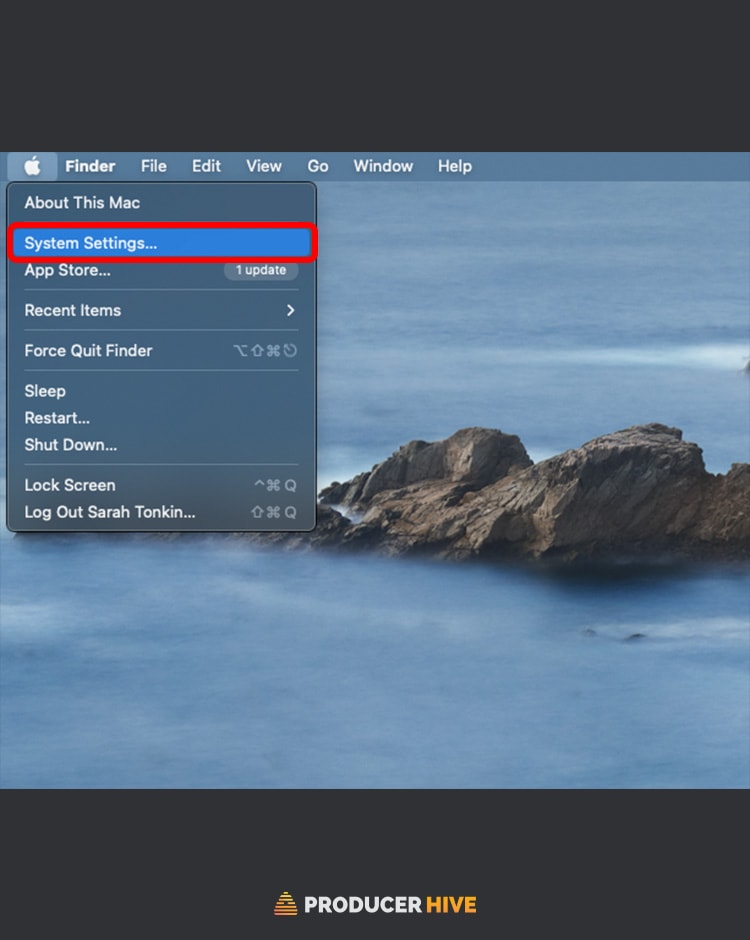
Listening to music on a Mac or MacBook? Here’s how to connect your speakers:
- Click on the Apple logo in the top left of the screen and select System Settings.
- Select Bluetooth, locate your JBL speaker, and click on it to complete the connection. Load up some music and test if the speakers are correctly connected.

To Windows
Connecting to Windows on PC and laptop is simple. Just follow these steps:
- Click the Start menu and select Settings.
- Click Bluetooth & Other Devices.
- Select Add Bluetooth Or Other Device.
- Locate your JBL speakers and click to connect.
- Your device is now connected. Confirm by playing some audio.


💡 Most PCs will have an in-built function for pairing Bluetooth devices, but older models may require a Bluetooth adapter.
Connecting Using The JBL Portable App
Alternatively, you can open the JBL Portable app once you have established a Bluetooth connection. From here, your JBL should be automatically detected.
The JBL Portable app (Android & iOS) is an intuitive smartphone and tablet option that gives you even more control over your JBL speakers.
Not to be confused with the JBL Connect app, ‘Portable’ offers unique functions such as a customizable pulse light show, adjustable equalizer, and the ability to manage connected speakers directly from your smartphone.
The app is currently available completely free.
JBL Speaker Troubleshooting Tips
Speaker Not Connecting Via Bluetooth
There are several reasons why your speaker may not be connecting successfully via Bluetooth:
Speaker Is Out Of Range
This is an obvious point, but consider how far away your speaker is from your device. It may have trouble connecting if you’re not nearby because your Bluetooth is out of range. Bring your speaker closer to your device and see if the problem persists.
Speaker Connected To Another Device
It could be that your speaker is currently connected to another device, which may stop it from successfully pairing with the one you want it to be linked with.
If other devices are nearby that you know the speakers have been previously connected to, disconnect them first.
Speaker Is Not Properly Charged
Ensure there is enough charge in your speaker.
You may encounter pairing issues if the speaker battery is low or near-empty.
Your Device Is Not Properly Charged
Conversely, is the device you are playing music from charged enough?
Some devices, such as the iPhone, will enter low power mode when the charge diminishes, which can cause Bluetooth to be disabled to preserve power.
How To Reset JBL Speakers
If all else fails, try resetting your speakers fully.
This isn’t a universal process across all JBL speakers. However, the general rule is to hold down two buttons for a few seconds to initiate a reset.
Usually, this is the Volume+ button and the Bluetooth or pause/play button. Doing so will cause the unit to power down.
The reset should be complete upon turning it on again, and the speakers will connect to your device.
If in doubt, consult your manual or refer to your model on the JBL website.
Before you go, check out our detailed walkthrough on How To Pair Your JBL Headphones To Any Device!
Also, check out How To Pair JBL TUNE 225TWS Wireless Earbuds (5 Easy Steps)

TIL: the latest batch of jbl “link” speakers do not allow bluetooth pairing until the speaker has been (a) added to the google home app, and (b) bluetooth pairing has been enabled through the google home app. (Afterwards, you cam delete the speaker from the google home app, and the bluetooth pairing button will continue to work.)
https://www.reddit.com/r/JBL/comments/h9nq5n/link_portable_not_pairing_on_bt/
Hey Tim,
I haven’t tried it myself, as I do not own any of the Link series, but I have also seen several threads on this. Let’s hope they fix it in a future update!
I have found out that JBL Bluetooth speakers and headphones only seem to pair with mobile phones and PC/Mac computers, and not with other devices such as TV’s and turntables. So always check for compatibility when buying a JBL BT device!
Hi Pieter,
I cannot vouch for turntables, but I have no issues connecting to my Smart TV with my JBL Flip 5. However, it depends on the model. I have seen numerous reports of the JBL Link series having issues connecting unless they are first set up within the Google Home app (as mentioned in the comment here by Tim).