- Learn the pros and cons of Ableton’s stock plugins
- Find out if they are worth using
- Also, check out our post on essential Ableton shortcuts to remember!
Assembling A Toolkit
Though some might say that “only a poor craftsperson blames their tools,” good tools never hurt in the world of music production.
A newcomer to the world of music production is immediately inundated with advice about the plugins they should add to their burgeoning toolkit but rarely do we hear voices advocating for the freebies that come with a Digital Audio Workstation (DAW).
That said, many award-winning musicians and producers, including household names like The Chainsmokers, Skrillex, and Disclosure, have released entire albums using mostly stock plugins.
Ableton Live Suite is a DAW that comes with a pretty comprehensive toolkit of plugins: the question is, are these stock plugins worth using?
The short answer is yes, most definitely, but read on for more details as to why.
Ableton Live Suite Stock Plugins: The Pros
Easy To Use
One of the difficulties of getting started in music production, or even getting started using new plugins as a seasoned producer, is learning new plugin workflows.
Ableton has made it incredibly easy to navigate its stock plugins by standardizing its user interfaces and controls.
The DAW features a message window in the user interface that tells users the function of the device they are using, along with some quick user tips.
Ableton also comes pre-loaded with tutorial sessions to help users learn the ropes of their stock plugins.
Third-party plugins often lack a comprehensive user manual or include something so poorly written that users shy away from exploring their full capabilities.
Wondering about pitch correction in Ableton? Here are 5 steps to success!
Simple Look and Feel
The user interfaces of Ableton’s stock plugins are intentionally simple and uniform.
Every Ableton stock plugin carries the same aesthetic design, and this can make it easier to master multiple devices within the DAW.
Third-party plugins that trade on over-the-top GUIs and recognizable imagery are at a disadvantage when it comes to usability, as space on the screen is at a premium, especially among bedroom producers working on a laptop or otherwise small screen.
The Ableton stock plugins are everything you need and nothing you don’t when it comes to screen real estate.
CPU-Friendly
It should be no surprise that Ableton stock plugins integrate seamlessly with Ableton Live. The smooth interoperability of the built-in plugins affords significant bang for your buck regarding CPU load.
Different computers will vary, of course, but for the bedroom producer running on a tight CPU budget, using stock plugins within an Ableton Live session will require a fraction of the CPU that would be gobbled up by the same session running third-party versions of the same signal chain.
This factor alone gives Ableton plugins a slight edge over third-party plugins, which may require more CPU load to run inside the DAW.
Not every producer can afford to buy a high-performance computer, so it should come as some relief to know that you can still do a lot of work using Ableton Live stock plugins exclusively.
Common Critiques Of ableton Live’s native Plugins
“Ableton Live’s Plugin Presets Sound Too Generic!”
Though Ableton plugins are powerful enough to produce world-class sonic productions, many entry-level producers can feel underwhelmed with the stock presets that come with Ableton Live.
And it’s understandable. With the amount of 3rd party preset packs that are heavily processed and that sound amazing right out of the gate, browsing through Ableton’s stock presets can feel relatively lack-luster.
In my opinion, this is the wrong way to think about it. Raw, unprocessed and simple tones exist often by design. They allow the producer to then shape, process these sounds to their heart’s content. Heavily processed sounds often don’t leave much room for this.
As a new producer, starting with raw sounds might not be as appealing as reaching for the super-processed neuro reese bass preset, but it forces you to work with what you’ve got, and a great way to experiment with post-processing yourself, instead of relying on other people’s sounds.
“Ableton Live’s Plugins Don’t Have Any Flexibility And Are Too Basic!”
I could get into a whole spiel about why limitations inherently breed creativity, but you’ve probably already heard it a million times (and I don’t want to lecture you on that).
This critique is however thrown around a lot by newer producers who haven’t explored the various ‘hidden features‘ on many of Ableton Live’s stock plugins.
Certain Ableton stock plugins come with extended dropdown menus that open up an extra layer of features and tools.
A great example of this is in the sidechain menu in the stock compressor.
This menu is labeled with a small triangle symbol on the toolbar of the compressor’s interface.
Another great example is the ‘’solo’ mode button on the stock EQ, which is indicated with a headphone symbol.
While I do feel this general critique on Ableton Live plugins isn’t quite true, I can admit that many of these extra features are easy to miss, especially for newcomers.
Top Ableton Stock Plugins: Instruments
Wavetable
Many would consider Wavetable to be Ableton’s premium synth device, and rightfully so.
Wavetable is a fairly new Ableton stock instrument and allows users to run up to two oscillators simultaneously to generate sound.
Each oscillator can be independently shaped, modulated, and mixed with various onboard user controls.
Wavetable is both rich-sounding and user-friendly and is an excellent tool for producers to master the fundamentals of synthesis.
Sampler
The Sampler device in Ableton does a lot more than basic slicing and stretching and is a deceptively versatile Ableton stock instrument.
Users can morph their sampled audio into various sustain and release modes, adjust the end and start times, and adjust elements like the playback speed and pitch.
Additionally, users can layer up to 3 independent LFOs into their samples, as well as introduce modulations.
Drum Rack

Ableton’s Drum Rack covers every user function needed to build drum and sample-based loops on-the-fly.
The device allows users to load up to 128 samples in one instrument, and each sample can be separately treated through a sampling window in the device.
The Drum Rack in Ableton also comes with a master bus with a basic but crucial mix and color controls to treat all your loaded samples like a single drum rack.
Top Ableton Stock Plugins: Effects
Drum Buss
Ableton’s drum buss was first introduced with version 10 of the DAW.
The device is a powerful all-in-one drum processor that allows users to instantly add some Drive, Boom, and Crunch to their drum loops using device chains or racks.
The drum buss even comes with a small onboard compressor, and each parameter can be pushed to generate some very aggressive-sounding drum mixes.
EQ Eight

EQ Eight is possibly the most commonly used device in the Ableton stock plugin library. EQ Eight is a parametric EQ with an extremely tactile user interface.
Users can place up to eight bands on their audio signal (hence the Eight in EQ Eight), and the built-in visualizer makes it extremely easy to dial EQ.
Special features include different EQ modes (Left/Right, Mid/Side, Stereo) and a solo mode that lets users pick out specific frequencies to listen to exclusively.
EQ Eight and Ableton Live’s stock compressor, in the hands of a skilled producer, might very well be all that is needed to mix and master a piece of music successfully.
Echo
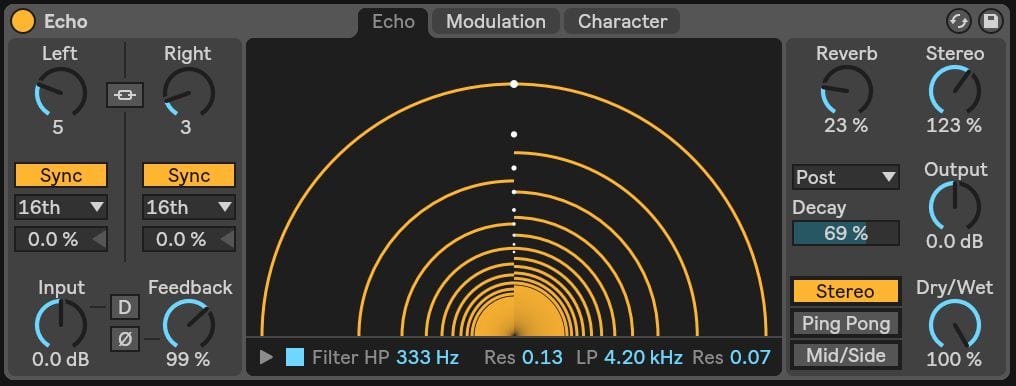
Of all the spatial effects in the Ableton stock library, Echo might be the most fun to play with.
The device provides a substantial selection of echo types, timing variations, and a gorgeous visualizer for real-time feedback .
Echo also features modulation and character panels that allow users to layer some extra color and motion to their echoes, and these can be pushed to create some dizzying results.
Echo even comes with an onboard reverb dial that adds considerable size and depth to the effect with little load on the CPU.
Wrapping Up
While some producers may believe that you can only achieve top-class productions with third-party plugins, this is simply not the case.
If the Ableton stock plugins were re-packaged and sold as third-party plugins, I suspect they would have a different reputation.
The Ableton stock plugins provide users with the fundamental tools they need to create impressive productions.
The Ableton stock effects and instruments are generally quite easy to use and powerful and dynamic enough to compete with many third-party plugins.
Check out our guide to The Best Ableton Live Export Settings (For Each Type Of Project)!