

- AirPods accidentally gone through the washing machine?
- Looking for fast solutions to dry your wet earbuds?
- Does rice work for wet AirPods?
- We list simple tips and solutions in our handy guide.
‘Help, I washed my AirPods!’ is a common statement I see from panicked forum-dwelling earbud owners.
While finding your AirPods in the wash can be a distressing situation, it’s important to know that there is a chance they can be fixed from water damage.
This guide offers simple steps for fixing wet earbuds, common FAQs, and troubleshooting tips concerning warranty, repair, and more.
What To Do When AirPods Go Through The Wash?
💡QUICK ANSWER: If your AirPods get wet, follow these steps:
- Shake them loose from excess water.
- Dry them with a microfiber cloth.
- Leave them in a simple drying solution or open air for 12-24 hours or until completely dry.
The answer to whether AirPods can survive going through the washing machine is not definitive. Different generations of Apple earbuds and cases are subject to different ingress protection (IP) ratings.
This means that some are water and sweat-resistant, and some are not. It’s worth noting that NO AirPods or their cases are waterproof.
Refer to the below table for IP ratings for AirPods & AirPod cases:
| AirPods Model | IP Rating | Water-Resistant | Sweat-Resistant |
| AirPods (1st & 2nd Gen) | N/A | No | No |
| AirPods (3rd Gen) | IPX4 | Yes | Yes |
| AirPods Pro (1st Gen) | IPX4 | Yes | Yes |
| AirPods Pro (2nd Gen) | IP54 | Yes | Yes |
| AirPods Pro (3rd Gen) | IPX4 | Yes | Yes |
| AirPods Cases | |||
| AirPods Pro (1st Gen) Wireless & MagSafe Case | N/A | No | No |
| AirPods Pro (2nd & 3rd Gen) Wireless & MagSafe Case | IPX4 | Yes | Yes |
| AirPods (3rd Gen) | IPX4 | Yes | Yes |
How To Dry AirPods
💡 The most important step to fixing your AirPods after they’ve gone through the wash is to dry them quickly (but naturally).
Below is a short list of the simplest, safest drying methods you can use to repair your earbuds:
Microfibre Cloth
The first step when finding wet AirPods is to shake them so that any excess water droplets immediately fall off. Once they’ve been shaken, users can dry all reachable sections of their AirPods with a soft towel or microfiber cloth.

After the excess water is removed, AirPods can be placed in a few environments or solutions that will help them dry quicker without damaging the electronics.
Air Dry
Once dried off, leaving your earbuds in dry, moisture-free areas is the first step to speeding up their repair process. Wet AirPods will dry quicker in areas with a natural draft, like a window sill. Airpods can be left in the sun to help speed the drying process, but this is not recommended for long periods or in hot climates.

Silica Gel
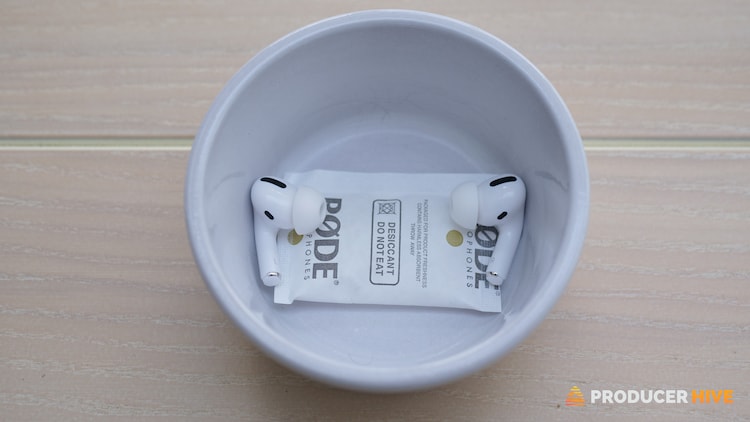
Many users should be familiar with silica gel if they’ve ever unpackaged electronics before. Silica Gel is used to collect excess moisture during shipping and is usually housed in a small paper parcel within an item’s packaging. Users can place their AirPods in a small container (lid recommended) with silica gel packets to help draw moisture naturally.
Rice
Many users have reported that their wet AirPods functioned correctly after being left in dry rice. Fully submerge them in a container of dry rice, seal the lid, and leave them for 12-24 hours.
Trying the abovementioned solutions before using rice is still recommended as rice has fine dust/flour coating it, which can get inside your AirPods.

Use The Water Eject Shortcut

💡 IMPORTANT: This is an alternative solution to try after you have tried the above steps. I say after because there is a risk of further damaging your AirPods with the Water Eject shortcut, as it requires your earbuds to be turned on, which may harm the sensitive electronics inside if still damp.
The Water Eject shortcut is a feature that helps to remove water from the speaker grill of the AirPods by using low-frequency sound vibrations. To activate and use this feature, follow these steps:
- Ensure AirPods have been rid of all excess moisture and switch them on, ensuring they are connected to your iOS device.
- Open the Shortcuts Gallery page for Water Eject in your browser.
- Click Get Shortcut and select Add Shortcut.
- Face the speaker grills downwards.
- Select Water Eject and press Start.
- Repeat the process until water stops emerging.
Have you lost or damaged ONE AirPod? Here’s what to do.
What Not To Do If Your AirPods Get Wet
Test AirPods Immediately
This mistake is understandable, but it could make or break the repair process of your AirPods. Wet AirPods should not be turned on immediately as this can further damage their components. Leave your earbuds in a drying solution for at least 12 hours before powering on.
Use Electric Heaters To Dry AirPods
AirPods are not designed to withstand extreme temperatures, especially after exposure to excess water. Electric heating, such as blow dryers or an oven, will do more harm than good when repairing AirPods.

Excessive Blowing To Speed Up Drying
Blowing into your AirPods with your mouth might seem like an intuitive step to speeding up the drying process. However, we also produce moisture in our breath, so excessive blowing could cause more moisture to collect within the earbud components.
Are AirPods Waterproof In The Case?
While you would be forgiven for thinking so–no, AirPods are not waterproof in the case. While the case can protect the earbuds from some exposure to moisture and water, it is not waterproof. The AirPods case is water-resistant, which means it can withstand splashes of water and sweat, but it is not designed to be submerged in water or exposed to excessive moisture.
Water-resistance ratings for different cases can be found in the table at the beginning of the article.
Does AppleCare Cover Water Damage To AirPods?
The one-year limited warranty provided by Apple does not cover water damage to AirPods or AirPods cases, whether accidental or not.
However, users with AppleCare+ can receive reduced service fees for up to two incidents per year. It’s important to know that each incident claim applies to only one AirPod. This means that if both earbuds succumb to water damage, you will have used up both incident claims for those 12 months.
While the standard replacement fee for lost or damaged AirPods and cases varies, users with AppleCare+ can expect to pay a flat rate of $29 (USD)–which is a considerable saving for items so prone to misplacement or otherwise.
We compiled a table summing up the cost benefits of AppleCare+ below:
| Product Type | AppleCare+ Replacement Fee | Standard Fee |
| AirPods (1st & 2nd Gen) | $29 | $69 |
| AirPods (3rd Gen) | $29 | $69 |
| AirPods Pro | $29 | $89 |
| AirPods Wireless & MagSafe Case | $29 | $69 |
| AirPods Pro Wireless & MagSafe Case | $29 | $89 |
Read our full guide: Is AppleCare+ Worth It?
FAQ
Are AirPods Sweatproof Or sweat-Resistant?
Understanding the differences between water-resistant, sweat-resistant, and waterproof can be confusing.
Generally, all AirPods are sweat-resistant except AirPods Gen 1 & 2. This means excessive amounts of sweat in these models can cause damage.
If you enjoy a heavy workout or live in a humid environment, then be conscious of any sweat that might come into contact with your AirPods. Keep them as dry as possible and wipe them with a dry cloth if exposed to excess sweat.
What is the water-resistance rating of Airpods?
You may be aware of ingress protection ratings if you’re wondering how AirPods are rated regarding water resistance.
This international standard rates pieces of electrical equipment versus their potential resistance from intrusions (specifically, in this case, water).
Currently, the only AirPods with an IP rating are AirPods 3rd Generation and AirPod Pro models rated at IPX4.
This means they have been tested to ensure they are water-resistant and sweat-resistant. So they should survive light rain, splashing, or sweat but won’t withstand heavy contact with water.
Can you wear AirPods in the rain?
The answer will depend on how heavy the rain is and how long you are in the rain. If you have any model other than AirPods 3rd Generation or AirPods Pro, then it would be advisable to avoid wearing them in the rain.
If you are a 3rd Generation or AirPods Pro user, then a little light rain shouldn’t pose too much of an issue, but be aware that as they aren’t waterproof, there will always be a risk.
Remember that the water resistance will reduce over time, so if you’re in the rain excessively, the risk of damage will become greater.
Can I Wear Airpods 3rd Generation Or Airpods Pro While Swimming Or For Watersports?
While AirPods 3rd Generation and AirPods Pro have been designed to offer some water resistance, you can not swim or do watersports with them.
Before you go, check out our guide: AirPods flashing orange? Here’s what to do.



Damprid or similar products (used to keep areas like dark closets or undersink cabinets dry) are great. They work the same way that silica gels or other dessicants work.
What does it mean turn them off, the iPod case?
I put it in the washer?