

- Discover how to pair and use your JBL Tune 225TWS easily.
- Learn control settings for your earbuds & troubleshooting tips.
- Also, check out this handy article on pairing JBL headphones!
This guide will demonstrate how to connect JBL Tune 225TWS earbuds to various devices and provide troubleshooting tips.
The following devices are covered:
How To Put JBL Tune 225TWS Wireless Earbuds In Pairing Mode
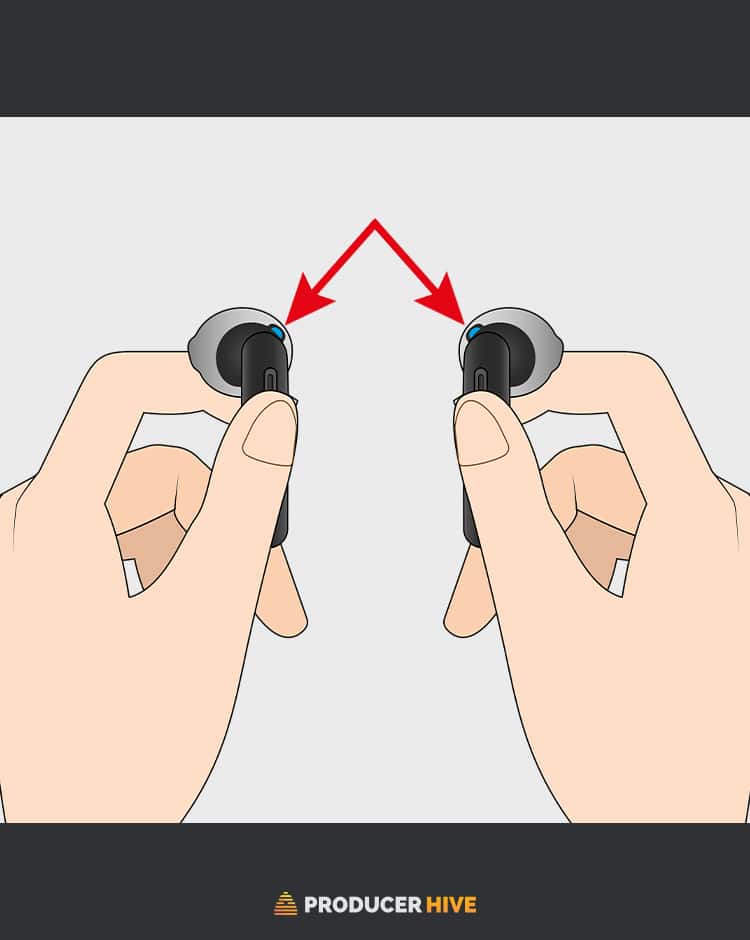
Here are the steps to put JBL Tune 225TWS wireless earbuds in pairing mode:
- Locate the multifunction button on the back of each earbud.

- Hold it for 5 seconds on both earbuds to put them in pairing mode.
- If the earbuds have been charged sufficiently, they will turn on after 5 seconds of holding the multifunction button.
- Both earbuds will flash blue, automatically searching for connections to nearby devices via Bluetooth.


How To Pair JBL Tune 225TWS
To iPhone
- Open Settings and turn on Bluetooth. Ensure your earbuds’ pairing mode is on.
- Hold the button on both earbuds for 3 seconds until the LED flashes.
- In the Bluetooth settings, select JBL Tune 225TWS from the list of available devices.
- Once connected, you should hear a confirmation sound or see a notification on your iPhone.


To Android
- Open Settings and turn on Bluetooth. Ensure your earbuds’ pairing mode is on.
- In the Bluetooth settings, select Pair new device.
- Select your earbuds from the list of available devices to connect.
- Once connected, you should hear a confirmation sound or see a notification on your device.


Note: If your Android device asks for a password when pairing with the earbuds, enter “0000”.
To Mac
- Click on the Apple menu on your Mac and select System Preferences.
- Turn on Bluetooth. Ensure your earbuds’ pairing mode is on.
- Select your earbuds from the Available Devices list.
- Once connected, you should hear a confirmation sound or see a notification on your Mac.


To Windows
- Go to the Windows Settings and click on Devices > Bluetooth & other devices.
- Turn on Bluetooth. Ensure your earbuds’ pairing mode is on.
- In Bluetooth settings, click on Add Bluetooth or other device > Bluetooth. Select your earbuds from the list of available devices to connect.
- Once connected, you should hear a confirmation sound or see a notification on your PC.
Note: If your PC asks for a password when pairing with the earbuds, enter “0000”.
JBL Tune 225TWS: Controls and Features
Dual Connect Feature
As well as the standard mode of using both earbuds simultaneously, the nifty Dual Connect feature lets you use either earbud in isolation. This can extend the product’s battery life by up to 50%.
To use Dual Connect, leave either earbud charging in its case and take the other out to use!
Manual Controls

- Power On/Off: Press and hold the Multifunction button for 5s.
- Reconnect Earbud(s): Press the multifunction button on your chosen earbud for 3s
Button Commands (When Using Both Earbuds)

Left Earbud
- Skip Song / Next Song: Press the Multifunction Button once.
- Rewind Song: Press the Multifunction Button twice.
- Answer / End Call: Press the Multifunction button once
- Mute / Unmute Mic: Press and hold the Multifunction button for 3s.
Right Earbud
- Play / Pause: Press the Multifunction Button once.
- Voice Assistant: Press the Multifunction Button twice.
- Answer / End Call: Press the Multifunction button once
- Mute / Unmute Mic: Press and hold the Multifunction button for 3s.
Button Commands (When Using One Earbud)

Left or Right Earbud
- Play / Pause: Press the Multifunction Button once.
- Voice Assistant: Press the Multifunction Button twice.
- Answer / End Call: Press the Multifunction button once
- Mute / Unmute Mic: Press and hold the Multifunction button for 3s.
FAQs
Does JBL Tune 225TWS Have Noise Cancelling?
Unfortunately, the Tune 225TWS has no active noise cancellation – though many JBL headphones do – and isolation is non-existent.
These earbuds aren’t your best bet for keeping sound in and noise out, although their robust hardware and neat in-ear design should do the trick for the most part.
Are JBL Tune 225TWS Earbuds Waterproof?
Unfortunately, no. JBL Tune 225TWS earbuds are not waterproof or splash-proof.
What Does ‘TWS’ Mean In Earbuds?
‘TWS’ means ‘True Wireless Stereo.’ A TWS Bluetooth headset lets you listen to your audio through earbuds without wires.
The TWS system uses Bluetooth signals to transfer sound from a device to the receptive earbud(s).
This stops the connection from breaking up when there is a physical obstacle between your device and earbuds, which can often be useful.
Wrapping Up
If you’re after a straightforward, easy-to-use pair of interactive TWS earbuds, the JBL 225TWS earbuds are your soulmate.
However, with the ever-rapid expansion and evolution of True Wireless Stereo earbuds, the JBL 225TWS Wireless Earbuds are a little outdated. They can even be hard to find on the market.
In such a case, we recommend readers check out the JBL 230NC TWS wireless earbuds, the latest wave of JBL’s True Wireless Stereo range.
Wondering how to pair Altec Lansing speakers? Check out our guide right here.


