- Discover the best drumming smartphone apps for both iOS and Android devices
- Explore a broad selection of free and premium drum apps
- Find the app that will let you compose, scribble ideas, and have fun
Even though getting into drumming can be quite a spooky experience considering the learning curve, it’s much easier today than it used to be until a decade or two ago.
You have a drum instructor on virtually every corner, dozens of online music academies, free tutorials on YouTube, and access to drumming gear specifically designed to cater to the needs of players at all skill levels.
One of the best things about modern drumming technology is the abundance of cool drumming apps. Even though there are dozens of unique drumming software, they can be easily categorized.
Some programs are for creators, enabling you to write drum music, mix, master, and spice up your drum tracks; some are “gamified” apps, which can further be split into entertainment and educational categories.
In my opinion, the best drumming apps have a bit of everything. They can teach you new tricks, provide entertainment value, and keep adding new content to keep the offering fresh.
If you’re interested in seeing what some of the best ones offer, stick with me as I review the best drumming apps for iOS & Android.
Searching for a gift for that special drummer in your life? We got you covered!
What Are the Best Drumming Apps for iOS & Android?
I don’t have a speck of doubt in my mind that Drumeo App is the ultimate drumming app.
Compatible with both iOS and Android devices, it offers a sophisticated training suite designed for both greenhorns and seasoned veterans.
It’s also packed with a variety of cool drumming tools, and you can purchase hundreds of lessons, but it’s not the cheapest app of the bunch.
If you’re new to drumming and want to get on a fast track to learning the basics, I recommend the Drum School App.
Regardless of how experienced, skilled, or talented you are, you may want to check the rest of my picks, so here’s a quick overview:
- Drumeo App (Our Pick)
- Drum School (Best Value)
- Real Drum: Electronic Drumset (Best for Android)
- DrumKnee 3D (Best for iOS)
- RD4 Groovebox (Best for Music Makers)
1. Drumeo App (Our Pick)
Drumeo is one of the leading drumming lesson providers, offering a comprehensive educational platform (Drumeo Edge) and mountains of free content across various social media platforms.
The company’s app is available for both iOS and Android devices.
Features:
- A mobile gate to Drumeo’s online drumming lessons
- Fully customizable user profile
- Playlists with various filters (songs, lessons, genres, etc.)
- Drumeo Edge learning paths
- A streamlined UI
- Over 200 courses and more than 1,000 songs
If I had to single out one app and declare it the ultimate, most enjoyable, and comprehensive learning tool for drummers of all genres and skill levels, it would have to be Drumeo’s drumming app.
This app was designed to give you mobile access to one of the most critically acclaimed online drumming platforms, allowing you to explore thousands of lessons and tutorials made by professional instructors and gigging musicians.
Drumeo’s app is different from the website only in that it has a slightly different interface. The layout is very similar to the platform itself, and any subscriptions or lessons you’ve purchased work on both.
It’s free to download and compatible with iOS and Android smartphones. When you download the app, you can watch the “40 Drum Rudiments”, enjoy up to 100 free songs, and practice the “9 free play-alongs” for free.
All other resources can only be accessed by members, meaning that you can either subscribe to one of their programs or purchase standalone resource packs, lessons, or learning paths.
The reason why I believe this is the best drum drumming app of all time is that it’s perfect for everyone.
You can learn at your own pace, spend as much time with any lesson as possible (since they’re available forever once unlocked), and upgrade your lesson playlist whenever you have the cash to purchase more.
The only downside of Drumeo’s app is that some of its best lessons and programs cost well above $100.
Numerous resources cost only $5-20, and I think it’s great that the company offers huge discounts for new members all the time.
Pros:
- Free to download
- Works with both iOS and Android devices
- Ideal for drummers of all skill levels
- Selectable courses, more advanced learning paths, or standalone lessons
- Days’ worth of video lessons, explainers, and tutorials
Cons:
- Many lessons and programs must be purchased and are expensive
Left handed drummer? Here are the pros, the cons and the challenges!
2. Drum School (Best Value)
Drum School is among the best premium drumming apps for iOS and Android devices.
It features dozens of video demonstrations, hundreds of exercises, and lessons on drum notation. It also packs progress-tracking tools and various challenges.
Features:
- More than 260 grooves covering all major playing styles and genres
- Over 133 exercises and lessons recorded with quality audio
- 12 video tutorials recorded by Ferenc Nemeth
- Six difficulty levels for challenges & progress-tracking tools
- Can be downloaded on iOS and Android phones
While exploring dozens of drumming apps on Apple and Google Play stores, I noticed a pattern.
Most apps were designed to either teach the basics to people that have never held a pair of drumsticks in their life or to give casual entertainment seekers a couple of minutes of extra fun each day.
There’s nothing wrong with that, but there’s not much value in beginner courses for experienced drummers or any real value to speak of in apps that you’ll forget about in a week or less.
When I came across the Drum School, I was quite amazed. The sheer amount of educational resources that even veterans might not be versed in, as well as practical instructional guides, is staggering.
This app rocks more than 260 recordings of drum grooves that stretch across all popular playing styles and music genres.
Even if you’ve seen hundreds of drummers perform and can tell a difference between a blast beat from a gravity blast, dissecting these grooves can broaden your drumming horizons and give you a fresh perspective on each drumming style.
As for the lessons, Drum School offers about 133 exercises. Although nearly half of them were made for beginners, the rest can benefit semi-pro and advanced-level drummers.
This app was created by Ferenc Nemeth, a famous Hungarian professional drummer that took the time to film 12 drum tutorials. The app is frequently updated, and the content keeps growing steadily.
Pros:
- Comes available at a dirt-cheap price
- No monthly fees or subscriptions
- The entirety of content becomes available with a single purchase
- Hundreds of drum exercises and drum grooves
- Interesting video demonstrations filmed with quality audio by Ferenc Nemeth
Cons:
- Mainly gravitated toward beginner drummers
3. Real Drum: Electronic Drumset (Best for Android)
Real Drum is a hybrid between a drum simulator and drum lessons. It’s an app that rocks a variety of quality drum kit sounds, plenty of tutorial videos, and several interesting tools.
It’s free to download and can be upgraded with purchasable content.
Features:
- Authentic MIDI-based drum simulator
- Dozens of video lessons and tutorials
- Over 100 unique drum kits with different sounds and aesthetics
- Drum part labels to help beginners learn different components of a kit
- Weekly updates with new sounds and videos
- Recording tool
There are hundreds of drum simulators you can find for your Android phone, but most of them become stale after a couple of days.
Clunky controls, a modest selection of MIDI sounds, and, worst of all, latency issues are some of the reasons why I gave up on quite a few in recent years.
And then I stumbled across Real Drum: Electronic Drumset. I wasn’t too impressed by the generic name, but after testing it for a couple of minutes, I noticed it had everything a drummer could need.
For greenhorns, Real Drum offers a thoroughly streamlined learning experience. Each drum part is named whenever the kit is loaded, and as soon as you switch kits, even the font of these labels changes.
Speaking of different kits, you’ll enjoy about one hundred different electronic drum kits, each sporting a unique sound and aesthetics. Furthermore, Kolb Apps, the creator of this app, is introducing brand-new kits each week.
These sound packs are exceptional, especially the rock, metal, and blues kits. At times, you won’t even remember that they’re MIDI-based.
Plenty of tutorials and challenges are there for beginners to explore, plus you can record your playing whenever you want.
As for the downsides, this app is free, but you’ll get to put up with ads. This is not necessarily a bad thing, as you can use some of these ads to get “rewards,” such as new sounds or cool kit styles.
It’s free to download on Google’s Play Store, but I’d consider it a premium drumming app since most of the content needs to be unlocked through in-app purchases.
Pros:
- Amazing drum sounds
- More than 100 unique drum kits
- Big pads for easy playing
- Each part is named for beginners to be able to learn quicker
- Simple drumming tutorials and challenges
- New content each week
Cons:
- Relatively frequent ads that can pop up at any time
- The majority of the best-sounding drum kits need to be purchased
Related: 10 of The Best Android Music Making Apps
4. DrumKnee 3D Drums (Best for iOS)
DrumKnee 3D is a highly versatile drum simulator for iOS smartphones, featuring inbuilt sensors that can activate the bass drum whenever the user moves their leg.
It was built to realistically recreate the sound of real drums.
Features:
- An innovative drum simulator
- A rich song library for play-along
- In-built motion sensor that activates the bass drum
- Recording button
- Purchasable drum packs
If you’re looking for a drum-practicing app that can vividly recreate the “feel” of playing real drums, DrumKnee 3D is as close as you’ll get on an iPhone or iPad.
This is one of the most advanced drum simulators for iOS since it packs an integrated motion sensor that allows you to “kick” the bass drum with real-life leg motions.
Place your phone on either of your knees and as soon as you start kicking with your leg, the app will register your movements and instantly produce a kick drum sound.
The cymbals, snare, and tom tones are outstanding, and you’ll get to customize your kit with a range of exquisite skins and sounds.
You can also record what you are playing in DrumKnee 3D with a tap of a button and even export the audio for future listening.
Pros:
- Free to download on Apple App Store
- Tap the screen and hit the bass drum hands-free with your leg
- Cheap expansion drum kits
- Great sound
Cons:
- Slightly more difficult to master than regular iOS drum simulators
Related: 14 Best Music Making Apps For iPhone & iPad (Paid & Free)
5. RD4 Groovebox (Best for Music Makers)
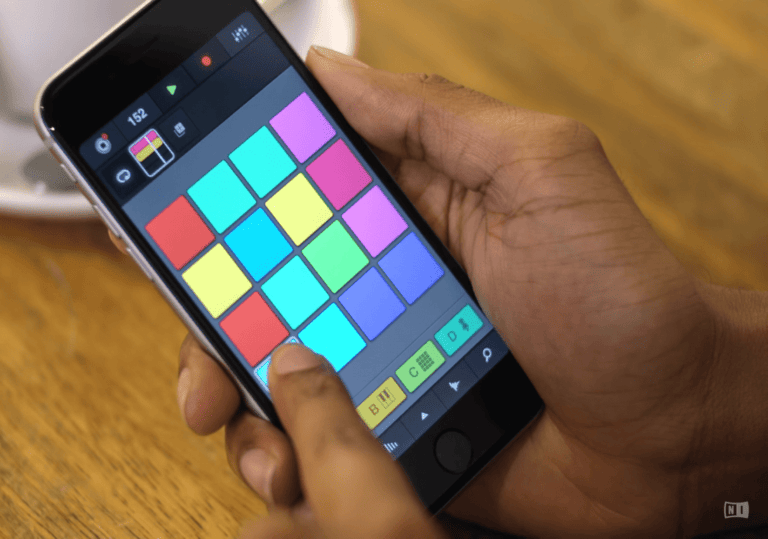
Mikrosonic’s RD4 Groovebox is a simple, free-to-use music-making app for iOS and Android that offers streamlined controls and ten unique drum kits, as well as four recording channels and five effects.
Features:
- Simple interface suited for even the smallest of screens
- Compatible with iOS and Android devices
- Beats, Analog, and Bassline types of sounds
- Five drum effects
- 10 MIDI kits
- Save, record, and export features
If you’re into creating beats, grooves, and drum music, you can do it on your smartphone with RD4 Groovebox.
It’s a basic drum maker app designed with outstanding MIDI support. Although its selection of sounds and kits is modest, each tone sounds amazing.
The RD4 Groovebox app is available for both iOS and Android devices, and it’s free to download, although you’ll need to buy packs (they are extremely cheap, though).
The only thing I didn’t like about this app is that it sometimes works clunky on iPhones, especially for users that have larger displays.
Pros:
- One of the simplest drum music makers for smartphones
- Excellent quality of sounds
- Highly customizable effects
- Multiple channels
- Several composition modes
Cons:
- Works a bit clunky on iPhones
Wrapping Up
Although there are hundreds of drumming apps you can find on Apple Store and Google Play Store, only a handful of them stand out as exciting and educational in the long term.
Check out my reviews in the sections above if you’re looking for an app that will give you hours of fun and help you elevate your drumming skills.
Want to get into drumming for real? Check out our guide to the 7 Best Online Drum Lessons/Courses (For All Skill Levels)!