

FL Studio Review (Is It Worth The Money?)
Scroll to the bottom of the article to view our full scoring breakdown.
Breaking Down Its Features & Capabilities
In this
- Plugins
- Design
- Functionality
- Ease of use
- Workflow
- Price
Stock Plugins & Sound Libraries (8.5/10)
FL Studio software are second to none and are highly regarded throughout the production industry as some of the best synth VST’s on the market, being able to create rich and immersive sounds from the ground up.
One of my personal favorites in the full version synth bundle is called Sytrus. Labeled as a ‘hybrid synthesizer’ it offers frequency modulation, ring modulation and subtractive synthesis. It has three independent filters, 13 filter types and some of the presets and patches such as the ‘depth-charge’ preset were even created by the likes of deadmau5, amongst others.

The host of stock plugins found in
The intuitive workflow of their native plugins make it one of the best options for beginners.
A good example of this visual aspect is the ‘Fruity Reverb 2’ plugin. The room shape and size is represented with a glowing wire-frame structure, and the user can see the amount of reverb represented by a dim or strong glow around the outlying shape of the structure. The size and shape of the room is also highly visual and adjusts in real-time according to the settings programmed using the sliders. You can add walls, remove walls, change the height, width, size, and shape of the reverb without even thinking about numbers. It’s intuitive to say the least.
Design/Interface (8/10)
Probably the most useful feature, when getting started in
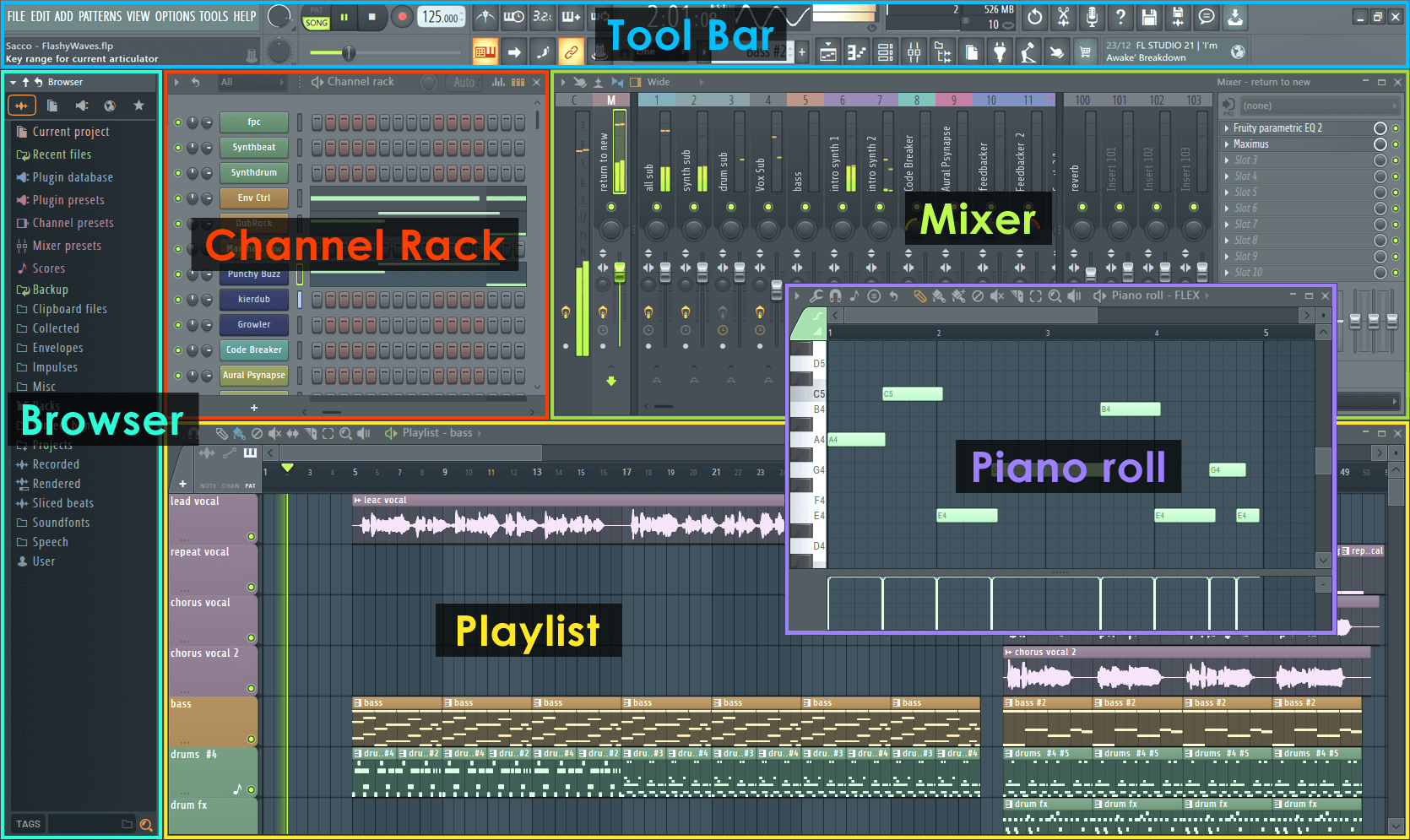
Most users of this program will be able to identify the step sequencer as one of the ‘staple’ tools within this DAW. The step sequencer functions as a ‘beat-grid’ of sorts, allowing for any sound or sample to be placed on the grid and be triggered as a part of a sequence.
The length of the grid can be as short as 2 steps or as long as 64 steps, and the samples themselves can be double-clicked on in the step sequencer window to open up the ADSR (attack, decay, sustain, release) functionality of any specific sample. This allows for time-stretching, reversing, pitch shift and a whole host of other interesting features and effects accessible from within the step sequencer.
It’s visually very intuitive. The application itself has a heavy focus on the way its native plugins interact within the DAW, and there are a LOT of native plugins.
The heavily visual nature of
Functionality (8.5/10)
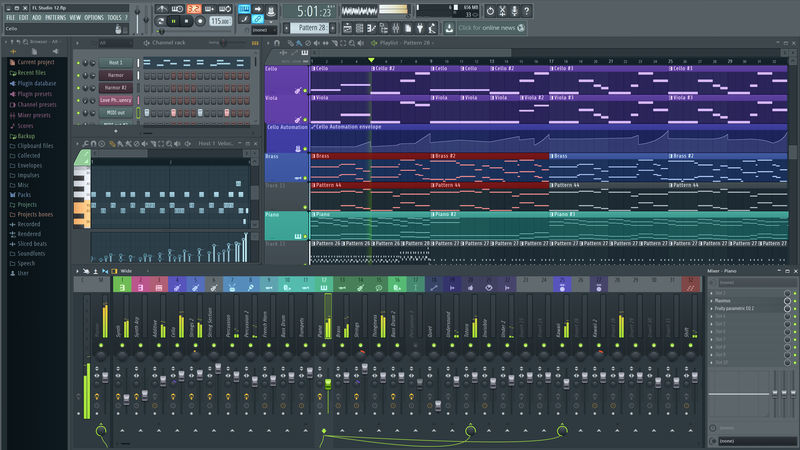
Following the creation of a couple of beat patterns on the sequencer, the user then has the ability to copy a pattern directly to the next step sequencer window (from pattern 1 to pattern 2) retaining all of the steps from the previous pattern 1 sequence but allowing for the expansion on the previous idea in the pattern 2 sequence without losing the original idea.
This can help the user create a fluid and interesting beat progression in no time, these features combined with the ability to paint patterns straight onto the playlist makes for a super easy and customizable workflow.
The playlist window itself is also an integral part of the software. Any sound or sample can be dragged directly onto the playlist (the same as the step sequencer) and be placed anywhere along the timeline.
The list of tools along the top of the playlist window such as the slice tool can be used directly on the audio to chop up patterns, sounds or samples that you have added, into smaller bits to use for arrangement or differentiation.
March 2021 FL Studio Update Note
With Apple’s new range of powerful processors hitting the market, Image-Line has included support for Apple Silicon M1 processors, as well as 64-bit native support for macOS. Another notable inclusion is that producers can now use Audio Units (AU) PLUS,
Ease Of Use/Learning Curve (8/10)
Upon opening up a blank
It is worth noting that recording instruments into
Workflow (7.5/10)
The ‘copy to next pattern’ function can help the user create a fluid and interesting beat progression in no time, these features combined with the ability to paint these patterns straight onto the playlist makes for a super easy and customizable workflow. The playlist window itself is also an integral part of the software.
Literally, any sound or sample can be dragged directly onto the playlist (the same as the step sequencer) and be placed anywhere along the timeline.
The list of tools along the top of the playlist window such as the slice tool can be used directly on the audio to chop up patterns, sounds or samples that you have added, into smaller bits to use for arrangement or differentiation.
The tools along the top of the playlist function almost behave like similar tools found in an image editing software in the way they intuitively interact with end-user and the audio clips.
Samples on the step sequencer can also be right-clicked and transitioned into a piano-roll format, allowing for heavier syncopation of drum hits and the pitching and playing of samples on the keyboard that otherwise wouldn’t be possible.
It is also worth noting that there is an FL Studio iOS application that allows you to save FL project files and transfer between your device and your computer, meaning you can work on the go pretty seamlessly. Also, if you like working with touch screens, you’re in luck (thanks to the app).
March 2021 FL Studio Update Note
Price (8.5/10)
FL Studio is currently available across 4 different pricing structures, with a one-time payment and a lifetime of free upgrades available. This means you only pay once and every time they update the core software, you get the new version for free.
Do note that you can buy any individual plugins from the Image-Line website, so if you’re only after a few bits and bobs, you can customize your own bundle and choose only what you specifically think you need.
Is FL Studio 20 Right For You?
All in all,
Still on the fence? Consider checking out our guide on how to choose the best DAW.


So which DAW would you recommend for ease of use and functionality?
Personally, I would recommend Ableton Live for ease of use and functionality. However, it’s worth grabbing a demo version of FL Studio to see if you vibe more with that. It’s ultimately down to preference, but a lot of people praise Ableton for its ease of use.
FL Studio is a tremendous piece of software to musically create any song in any genre imaginable. Those who lock it down to one musical style don’t know what they are talking about. The interface is flawless, fast, lightning fast, intuitive and modern. One of the best on the market, above Pro-Tools, which is an old and boring dinosaur. Creating a good sounding track, cutting it and editing it is so easy in FL Studio! The editing and sound modules, compressors, limiters, etc. are excellent! When you first open FL studio it takes about 3 seconds, Mixcraft takes three times as long, Studio One takes almost 30 seconds or more. There are many who say that a DAW has no sound of its own, but the FL Studio console lives when you add editors, compressors, etc., the sound shoots up to an incredible quality. In Mixcraft for comparison, it sounds flat and muffled, the same as in Studio One or Bitwig. In FL Studio the sound is fat, creamy and dense, modern and elegant at the same time, making the producers ears can have a close vision of what the final master will sound like. What I don’t like about FL studio is that sometimes the mouse click behaves unpredictably, the synths you assign are not automatically associated to a channel and that’s a bit confusing. Some of the built-in synthesizers are mediocre sounding and unintuitive, not all of them…Directwave sounds like Kontakt the same, Sytrus sounds incredibly clean and analog at the same time, it’s like having a Korg Chrome inside FL Studio. FLEX is great for pads and atmospheric sounds. The Patcher where you can mix anything you can think of responds like a tool out of this world! The piano-roll that works here works wonders and there is no current DAW that can come close in its performance and versatility, a marvel for composing well and fast. If you don’t use any DAW yet and you are thinking about one, don’t hesitate with FL Studio, it’s a dream DAW, it’s perfect? NO, but it will make you smile in every song you compose, produce and listen to with it.