- Take complete control over your music with a specialized DAW control surface.
- Here are the 7 Best DAW Control Surfaces!
Control surfaces allow users to utilize a more hands-on workflow inspired by the analog world. Instead of using a mouse and keyboard to control your DAW, you will be riding real faders and twisting trim pots as if you were working on an analog console.
Some engineers and music producers find adding a Control Surface to their home studio advantageous as this kind of workflow can be more intuitive to some. For example, many would consider writing automation by pushing a fader far easier than trying to fulfill the same task with a mouse.
Control surfaces may also help with physical issues such as carpal tunnel syndrome, which can make the use of a mouse and keyboard very painful.
(For the ultimate roundup of portable MIDI controllers, look no further than our list of the 7 Best Portable MIDI Keyboards (For Traveling Musicians))
What Are The Best DAW Control Surfaces?
The PreSonus FaderPort 16 is our pick for the best control surface; it has a healthy balance of useable features and portability, all coming in at an affordable price.
Pros that demand the best will love the Avid S4 , which offers unmatched hands-on control. Unfortunately, not many will love its price. But hey, it is what it is.
Overall, these are our candidates for the best DAW control surfaces out today:
- PreSonus Fader Port 16 (Our Pick)
- Mackie MCU Pro
- SSL UF8 Advanced DAW Controller
- Tascam 12 Mixer/Interface/Controller
- Icon Qcon Pro X
- Softube Console 1 MKII Control Surface
- Avid S4 Semi Modular EUCON Control Surface

- 16 motorised 100 mm faders without taking over your desk
- Comes with Studio One Artist and the Studio Magic plugin suite
- Built for Studio One, and tested with Cubase and Pro Tools

- Mackie Control protocol, so most DAWs work with no manual mapping
- 100 mm touch-sensitive Alps faders, 50+ buttons and a backlit LCD
- Rugged metal case, with a built-in MIDI interface

- Runs up to 3 DAWs at once, for example track in one and mix in another
- SSL 360 and Soft Keys give control beyond what MIDI alone supports
- Pairs with SSL plugins, and the build is top-tier

- Control surface, 12-channel mixer and audio interface in one box
- 8 built-in mic preamps
- Familiar mixer layout with a vintage look
- 12-segment LED metering shows levels without watching the screen
- 8 motorised faders, with an optional extension to add more
- Mackie Control is built in, and free Bitwig 8-Track and Harrison software are bundled

- Controls a channel-strip plugin (an SSL SL 4000 E model) instead of your DAW's faders
- Every plugin parameter is on the hardware, so you can mix without looking at the screen
- Works in any DAW that supports AAX, VST, VST 3 or AU, and it's USB-powered

- Modular: you pick a frame, then add up to 3 optional modules and 4 displays
- Touch displays and motorised faders, with deep EUCON control of your DAW
- Aimed at commercial studios, venues and education, and priced accordingly
1. PreSonus FaderPort 16 (Our Pick)
- 16 motorised 100 mm faders without taking over your desk
- Comes with Studio One Artist and the Studio Magic plugin suite
- Built for Studio One, and tested with Cubase and Pro Tools
Overview
PreSonus’s FaderPort line of DAW Control Surfaces has taken the market by storm ever since the introduction of the original FaderPort in 2006. The FaderPort 16 brings added features to this line of Control Surfaces, cementing their status as a modern classic.
Features
- Motorized control surface for Mac and PC
- Mix with precision via 16 touch-sensitive, 100 mm motorized faders
- Identify channels at a glance via 16 high-definition scribble strips
- General session controls include Undo/Redo, Arm All, Solo/Mute Clear, and Click On/Off with tap tempo
- Session Navigator controls include Track Scrolling, Channel Banking, Timeline Scrolling, and more
Review
The bigger brother of PreSonus’s highly successful FaderPort 8, the FaderPort 16 expands the former by adding 8 extra 100mm motorized faders. Making for a total of 16 faders, this design will save time for engineers and producers working on the fly as they will not need to cycle between as many window instances to monitor their session.
The faders themselves feel sturdy and smooth to use. For a mid-price controller, the FaderPort 16 exudes professionalism and doesn’t take up too much room on a desk (despite featuring 16 faders).
The main transport section of the PreSonus FaderPort 16 allows you to work more efficiently; here, you get general session controls such as undo/redo, solo/mute clear, track management, and more, plus you can switch automation modes instantly. One glaring omission was the absence of both pan pots and a master fader, but taking into account what else this package provides, we can overlook this.
Another solid feature of the FaderPort 8 is Session Navigator. This handles crucial tasks such as track scrolling, channel banking, and other navigation needs. Dedicated buttons make it easy to create and arm tracks, view buses and VCAs, and manage many tasks.
Additionally, four programmable User buttons enable you to put your most-needed DAW functions right where you need them acting as valuable shortcuts.
Plugin parameters and bus sends can be adjusted via the faders. PreSonus is also generous enough to include the Studio Magic Plug-in suite and their own Studio One Artist DAW. The FaderPort 16 is optimized to work natively with Studio One; however, we successfully tested our unit with both Cubase and
Pros
- 16 motorized faders
- Affordable price point
- Bundled with plugin suite and DAW
Cons
- There may be better choices on our list for users who aren’t using Studio One
- Might require additional software to use with other DAWs
2. Mackie MCU Pro
- Mackie Control protocol, so most DAWs work with no manual mapping
- 100 mm touch-sensitive Alps faders, 50+ buttons and a backlit LCD
- Rugged metal case, with a built-in MIDI interface
Overview
The Mackie MCU Pro was designed to bridge the gap between digital flexibility and analog sensibilities. Features a simple USB plug-and-play setup; this control surface will work with nearly any DAW—our premium pick for even the most discerning engineer.
Features
- Expandable touch-sensitive control surface with 100 mm Alps motorized faders
- Proprietary Mackie communication protocol for easy production software integration
- V-Pot control over software, plug-in effects, and virtual instruments
- More than 50 dedicated buttons for fine control of software parameters
- Tape-style transport controls
Review
The Mackie MCU Pro is a touch-sensitive control surface that allows you to add a real console feel and analog vibe to your workflow. Featuring Mackie’s Proprietary communication protocol for easy software integration and an integrated MIDI interface for direct connection to your computer and external MIDI gear.
This lets you get the most out of your software, giving you accurate control over setups and control surface assignments with no tedious mapping required to do so.
The Mackie MCU Pro’s 100 mm touch-sensitive Alps motorized faders give you an accurate, smooth, real-console-feel to your DAW productions.
This control surface also features over 50 dedicated buttons, accurate V-Pot rotary encoders, plug-in effects, and virtual instruments.
With the detailed backlit LCD, you can easily monitor your mixes in real time. Even the outer casing of the Mackie MCU Pro is built from a rugged metal that is sure to stand the test of time within your home or commercial studio.
Overall, this is a premier choice for having control of your DAW at your fingertips, all from one of the most respected names in the business.
Pros
- Console feel
- High-grade functions and components
- Will work natively with most DAWs
Cons
- Users report dimming of the LCD display after years of use
- Expensive
3. SSL UF8 Advanced DAW Controller
- Runs up to 3 DAWs at once, for example track in one and mix in another
- SSL 360 and Soft Keys give control beyond what MIDI alone supports
- Pairs with SSL plugins, and the build is top-tier
Overview
SSL is widely recognized for its decades of expertise in analog console technology, and their contributions to the field have set the standard other manufacturers strive to achieve. With such a prestigious name backing this Control Surface, does the SSL UF8 uphold this legacy?
Features
- 8 motorized touch-sensitive faders
- 8+1 push/push rotary encoders
- RGB backlit soft-touch rubber controls
- Works with most major DAWs, Logic,
Pro Tools , Nuendo, Cubase, Studio One, Ableton Live etc - Up to 3 different DAWs can be connected simultaneously
Review
The UF8 features a stellar build quality which immediately impressed me. All of the controls feel top tier, and we were hard-pressed to find any issues in relation to the construction of this unit.
In use, we found SSL360 and the Soft Keys to provide a phenomenal amount of DAW control far beyond what the unit’s MIDI protocols actually support. Setting up the unit was extremely easy, and we were able to test the UF8 with a variety of major DAWs without encountering any issues in the process.
Interestingly enough, this unit can juggle 3 DAWs simultaneously, which may make it the perfect pick for any engineer who is using one DAW to track in and another to mix, or any other combination that would require the user to implement multiple DAWs at once.
If you’re already invested into SSL’s ecosystem of plugins, the UF8 pairs really well with them.
With all of this functionality established over a simple USB connection, we found the UF8 to be a stellar unit. Certainly adhering to the high standards set by its manufacturer, Solid State Logic.
Pros
- Stellar build quality
- Can operate 3 DAWs at once
- Works natively with most major DAWs
Cons
- Price point will rule this option out for some users
4. Tascam 12 Mixer/Interface/Controller
- Control surface, 12-channel mixer and audio interface in one box
- 8 built-in mic preamps
- Familiar mixer layout with a vintage look
Overview
The Tascam 12 Mixer/Interface/Controller is a multi-purpose unit that excels both on stage and in the studio. Backed up by Tascam’s legacy, how does this Controller fare against the competition?
Features
- Great sounding 12-channel recording solution
- A classic analog aesthetic that is both intuitive and attractive
- 60mm faders provide precise control
- Inbuilt recording interface with 8 quality microphone preamps
- Easy DAW Integration
Review
The Tascam 12 Mixer/Interface/Controller offers an all-in-one recording, DAW Control, and computer integration solution. Tascam has gone all out to ensure that the Tascam 12 Mixer/Interface/Controller can serve as the centerpiece of any home studio, offering a plethora of uses for the modern music maker.
As a DAW Control Surface, the Tascam 12 integrates seamlessly with most DAWs offering a fuss-free setup without requiring third-party software. 8 high-quality mic preamps and an inbuilt audio interface send this package to the next level, essentially playing the role of two units simultaneously.
We also love the vintage aesthetic Tascam has brought into play when designing this unit, which doesn’t only serve its purpose as a visual tantalizer.
The layout harbored on this control surface will be highly intuitive to anyone who has used a standardized mixer, ensuring that you will be up and running with your new unit in no time.
The Tascam 12 Mixer/Interface/Controller is an exciting addition to our list; providing so many features at a competitive price point certainly makes this one worth considering.
Pros
- Essentially three hardware units in one box
- Easy DAW integration
- Stylish vintage aesthetic
Cons
- Some users may not require this level of functionality, especially if they are only looking for a stand-alone control surface.
- The Tascam 12 has no motorized faders, so there is no easy way to re-call sessions.
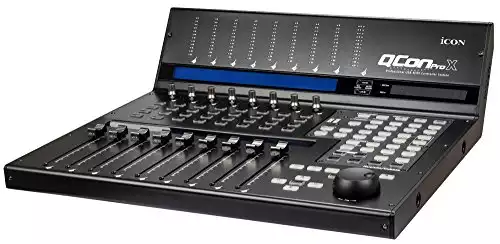
5. Icon Qcon Pro X
- 12-segment LED metering shows levels without watching the screen
- 8 motorised faders, with an optional extension to add more
- Mackie Control is built in, and free Bitwig 8-Track and Harrison software are bundled
Overview
The Icon Qcon Pro X has garnered much attention in the Modern Control Surface market, providing many features to any music maker’s home studio.
Features
- 8 touch-sensitive motorized faders
- 12-segment LED metering on LED bridge
- Mackie control build-in for Cubase, Nuendo, Samplitude,
Logic Pro , Abelton Live, Reaper, Reason, Studio One, and Bit wig - Optional extension provides extra functionality
- Software bundle included
Review
The Icon Qcon Pro X is a stylish unit boasting 8 motorized faders that feel great when put to use, avoiding some of the pitfalls that other manufacturers can fall into when providing motorized faders at this price point.
The 12-segment LED metering system that Icon has opted to incorporate into this unit provides clear and accurate monitoring for each channel, and we were never left wondering what exactly it was we were looking at while using the Qcon Pro X.
Mackie control build-in ensures that the Icon Qcon Pro X will play nicely with most major DAWs, including Cubase, Nuendo, Samplitude,
This bundle also includes free recording software, such as Harrison 32C Vocal Intensity Processor, essentially a “greatest hits” collection of features from Harrison’s analog console heritage. As well as Bitwig Studio 8-Track, a trim, and DAW suitable for any new producer or engineer.
Pros
- Inbuilt metering
- Motorized faders
- Option to expand the unit
Cons
- May occupy too much desk space for some users.
6. Softube Console 1 MKII Control Surface
- Controls a channel-strip plugin (an SSL SL 4000 E model) instead of your DAW's faders
- Every plugin parameter is on the hardware, so you can mix without looking at the screen
- Works in any DAW that supports AAX, VST, VST 3 or AU, and it's USB-powered
Overview
Mix your entire project without looking at your computer screen; the Softube Console 1 MKII Control Surface gives you hands-on control of every parameter of the included SSL SL 4000 E channel strip plugin. This provides a fuss-free and intuitive console-like experience within your DAW of choice.
Features
- Analog-modeled EQ/Compression/Saturation and Dynamic shape plug-in with a hardware controller.
- Emulates the sound of the classic SSL SL 4000 E Console
- Every plug-in parameter controllable from the hardware
- USB-powered and connected
- Seamless integration with any DAW that supports AAX, VST, VST 3, or AU plug-in formats
Review
The Softube Console 1 MKII Control Surface provides an interesting take on the modern Control Surface, offering hands-on control of every plug-in parameter in an intuitive, easy-to-use hardware unit. Load up an instance of the Softube plug-in on each of your project’s tracks, and you will have access to a channel strip painstakingly modeled off of the classic SSL SL 4000 E analog console.
This means you could mix any project without ever having to look at your computer’s monitor; all of the functionality required to get the job done is ready and accessible on the Softtube Console 1 MKII hardware unit.
This Control Surface will integrate seamlessly with any DAW that supports AAX, VST, VST 3, or AU plug-in formats, removing the headache of integrating this hardware unit into your software. This means that you can get to mixing sooner without spending hours flicking through an instruction manual.
The Softube Console 1 MKII Control Surface connects and draws power by USB again, making it a versatile choice for any music maker looking to incorporate an analog workflow into their home studio.
Pros
- Analog workflow
- The sound of an SSL SL 4000 E console at home
- Integrates seamlessly with almost any DAW
Cons
- The base functionality of this unit may not appeal to some users who aren’t interested in Softubes hardware emulations
7. Avid S4 16-fader Semi-Modular EUCON Control Surface (For Those Who Want It All)
- Modular: you pick a frame, then add up to 3 optional modules and 4 displays
- Touch displays and motorised faders, with deep EUCON control of your DAW
- Aimed at commercial studios, venues and education, and priced accordingly
Overview
Providing a robust workflow to the most discerning professional, the Avid S4 promises immersive mixing, sound design, and editing and rounds out our list as our premium choice.
Features
- Comes prebuilt and configured in one of 3 standardized Avid frames
- Expandable
- Semi-modular design
- Deep DAW control
- Customizable
Review
The Avid S4 is a fully customizable professional control surface designed for commercial studios, venues, and educational facilities. Unlike its bigger brother, the S6 the S4 comes pre-configured in one of several avid frames, allowing you to select which additional modules you would like to integrate with your control surface.
The Master Touch, Automation, Channel Strip Modules, and frame are all Core Modules utilized in every S4 Control Surface. These modules cover the fundamental tasks associated with audio production and essentially serve as the foundations upon which the unit is built.
In addition to these Core Modules, you can add a further 4 displays and 3 Optional Modules “depending on the frame you select”. These optional Modules include the Display Module, Joystick Module, Post Module and Attention Knob Module. All of these provide the Avid S4 with added functionality which can be tailored to your own needs and requirements as an engineer.
With beautiful touch displays, motorized faders, and the ability to truly make this Control Surface your own, you can see why the Avid S4 is our top pick for the 7 Best Control Surfaces.
Pros
- Fully customizable
- Top of the line
- Unparalleled functionality
Cons
- Not a realistic solution for most of us
Wrapping Up
Control surfaces can be a great addition to your home studio, especially if you seek a more traditional workflow beyond the point and click of a computer mouse and keyboard. Introducing a Control Surface to your studio may inspire you to embark on new ideas that may not have occurred to you previously.
FAQ
Motorized Faders vs. Non-Motorized Faders?
Once only associated with the most high-dollar hardware units, Motorized Faders are quickly becoming a standardized feature on most Control Surfaces as manufacturing costs have come down. The appeal of Motorized faders is due to the array of functions they provide, the main one being instant recall.
The only real benefit to Non-Motorized Faders is the fact that they are cheaper to replace in the scenario that the slider becomes broken.
Do I need a Control Surface?
With many professional engineers opting to sell off their expensive hardware and outboard gear in favor of the simplicity of working with a mouse and keyboard “See Dr. Dre. selling his famous SSL 4052 E Console,” it could be argued that no one needs anything besides a DAW and a mouse to make records in the modern era.
However, the workflow you unlock via purchasing the right Control Surface could benefit your productions profoundly, enabling you to make records more efficiently while enjoying the process more than ever.
There is no right or wrong answer; it all depends on the production style of the individual engineer/producer.