- Learn how to read any beginner-level drum tablature
- Learn what drum symbols mean and how to play them
- Understand the key differences between traditional and digital drum tabs
- Also, check out our post on all the different types of drums and percussion!
Tabs can be used for various purposes. Some musicians learn songs this way; some use them as reminders, while others make tabs to put their song ideas on paper and share them with friends or band members.
Guitar, bass, keyboard, and violin notations are almost universal, with the main difference being in the number of strings or frets (for simplicity’s sake, these tabs will be referenced as “guitar tabs” throughout the article). Drum notation is slightly different since drums come equipped with different parts and features.
At the same time, drum tabs are also depicted on “the staff”; they feature a lot of similar elements like the key signature, tempo, and various note symbols.
In this article, you’ll find valuable tips and information that will help you learn how to read drum tabs in a flash, so let’s start from the top.
Drum Tabs at First Glance
The first section will briefly explain the basic elements in drum tabs that are “universal” – both handwritten and digital drum tabs feature them, and when you understand these parts, you will be able to follow any tablature or drum notation.
The Staff

What all tabs have in common is a set of five lines where notes are placed. This is called “staff”, and it enables the musician to accurately pinpoint note positions with ease.
All of the elements that will be mentioned in the next sections belong to the “staff”, including drum notes, key signature indicators, bar dividers, tempo indicators, dynamic markings, and more.
Beats

In guitar tabs, each sound corresponds to a note. In drum tabs, these notes are called “beats”. Each beat is then assigned its place depending on which drum part it is played on and further explained by the note length value, dot markers, and other dynamic markings.
Drum Parts & Drum Notes
The Staff in guitar tabs depicts the strings of a guitar, and the note symbols usually depict which fret is supposed to be pressed. In drum tabs, the Staff divides the drum kit vertically.
Simply put, imagine six lines going through your drum set:
- The first line is drawn above your pedals; the notes below it correspond to the closed hi-hat sounds
- The second line is drawn through the center of the bass drum; the notes below it correspond to kick sounds
- The third line is drawn above the top of the bass drum and the floor tom, but the symbols below it only correspond to floor tom sounds
- The fourth line is drawn above the snare and goes through the first tom; the notes below are snares, and the notes on this line are Tom 1s
- The fifth line is drawn above the Tom 2 and goes through the Ride cymbal; the notes below are Tom 2s, and the notes on this line depict the ride; the notes above depict hi-hat
- A sixth line is only drawn in sections where it is needed; the notes going through it depict the Crash cymbal
Symbol Types: Rounded Symbols, Xs, Os, and Stems
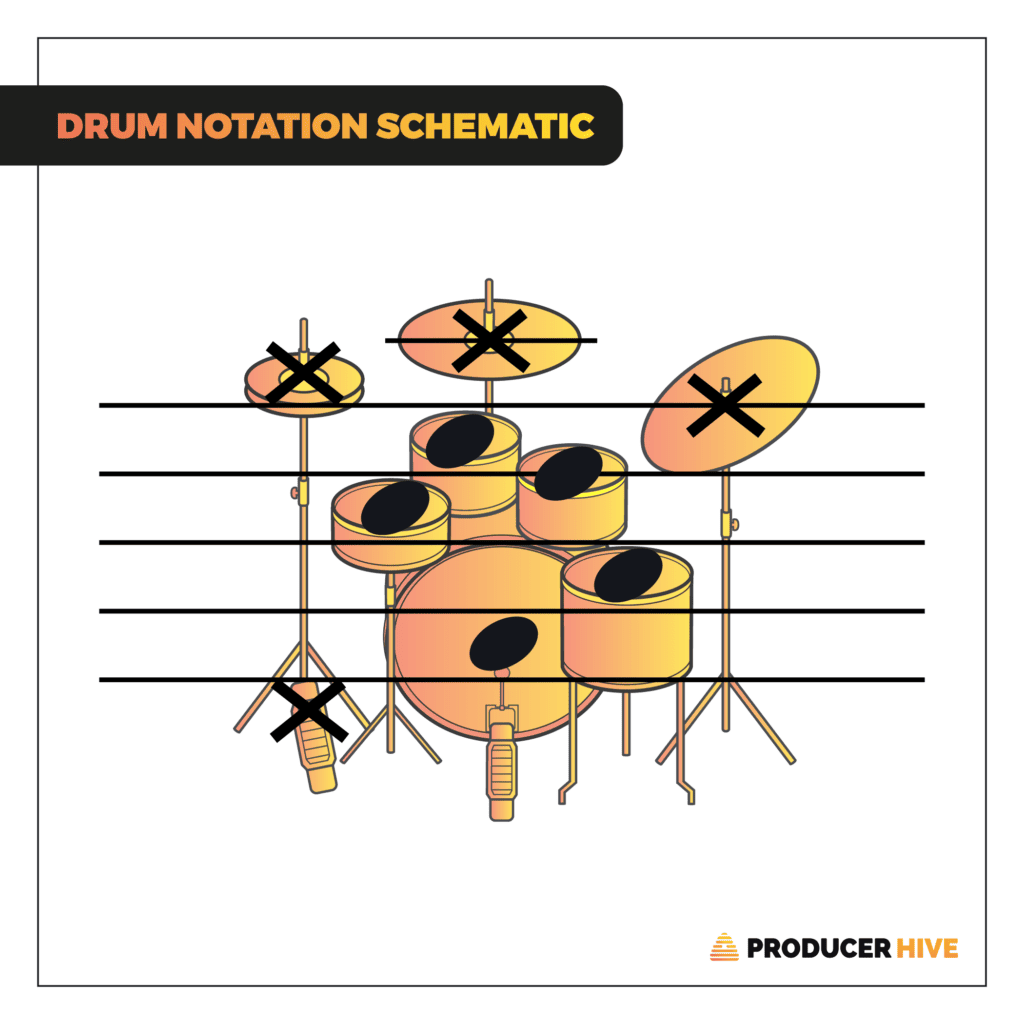
For the clearer distinction between “wooden” and “metal” elements of a drum kit, they are typically noted as rounded notes or Xs. Since hi-hats can be played as opened or closed, in the case of the former, the notes are depicted with Os.
All rounded notes correspond to sounds you’re supposed to make with a “basic” drum kit: kick pedal, snare, and toms. The cymbals (including hi-hat) are notated with “X” marks. Knowing this, drum tabs are easier to follow.
For an easier distinction between notes that are supposed to be played with drumsticks or pedals, look for the direction in which the “stems” of the note symbols are pointing.
Downward-facing stems indicate that these notes should be played with foot pedals (hi-hat, drum kick), while upward-pointing stems indicate that the notes should be played with sticks; the only exception is the full-note symbols (since they don’t have a stem).
Note Length Values

Guitar notes can last a fraction of a second, be sustained for multiple bars, or anything in between. In drum tabs, note length values follow the same logical principle when it comes to cymbals (which can reverberate for quite a while).
For (wooden) sounds that will inevitably decay after a few seconds, notes with longer values are easier to use instead of drawing/typing pause marks. The main reason why it’s important to understand note length values is to know how many times within a single bar you’re supposed to play a certain drum part.
Dots
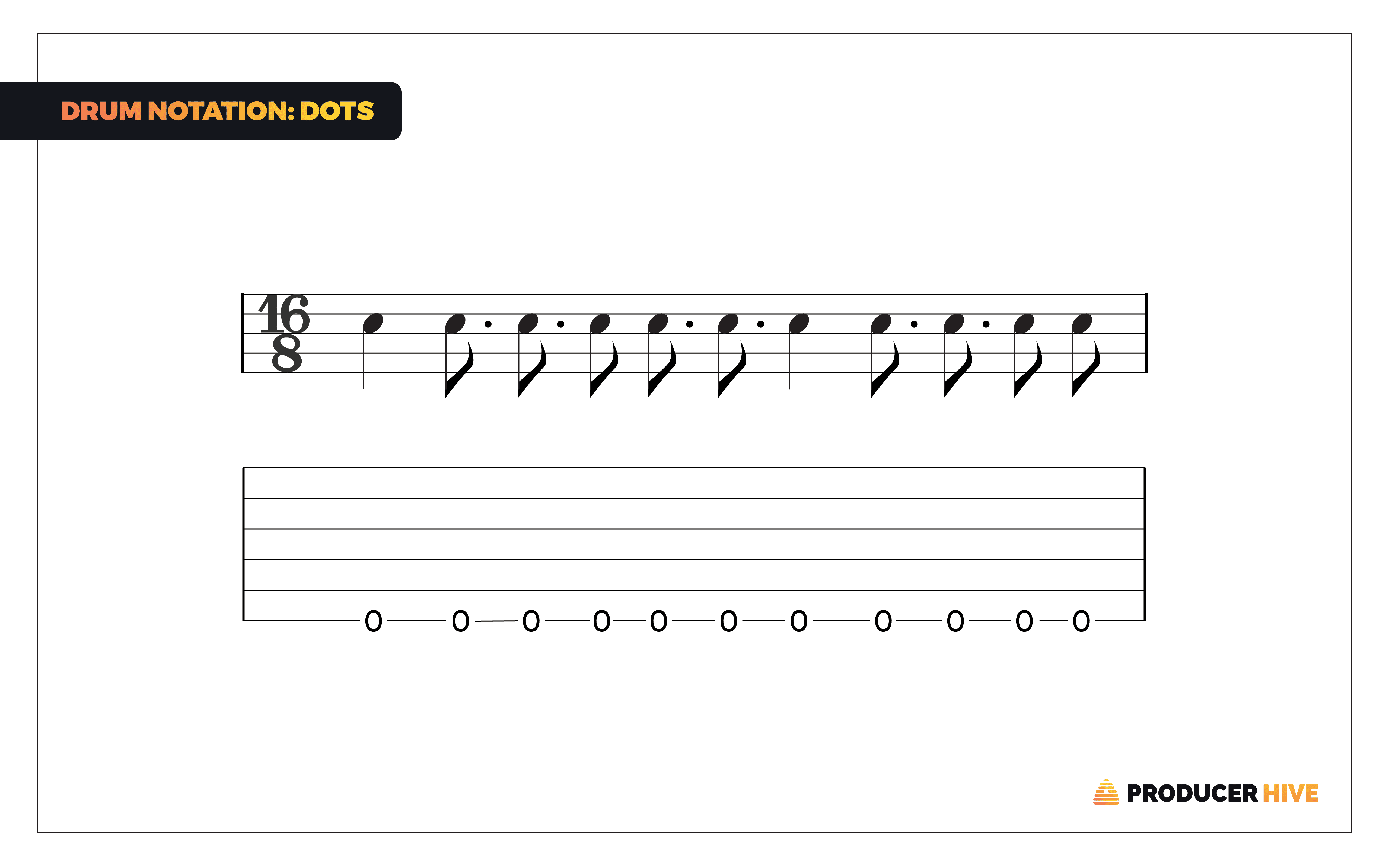
Whenever a dot appears next to any symbol (whether it be a note or a rest), the duration of the indicated symbol is multiplied by 1.5x. This is mainly used to make the tab more scannable by making existing symbols last longer (e.g., a dotted half-note in 4/4 will last ¾ beats, leaving up only a quarter left for other symbols).
It’s important to note that dotted notes cannot exceed the maximum length value of the current time signature (e.g., a dotted full note in 4/4 will not last 6/4 beats).
Drum Tabs & Time
The following drum tab elements are used to help the drummer navigate the “temporal” elements of a song, including the key signature, bars, and tempo.
Bars

Bars are used to split the song into quantifiable measures. One bar is a fraction that can be a lick, a repetitive riff, or a simple fill. The totality of a song notation is divided by vertical bars (hence the name), telling you which notes belong to which parts.
To keep tabs shorter and easier to digest, drummers can add two inward dot markers next to each of these vertical bars – in this case, the marked parts are supposed to be repeated once (or if it should be played multiple times, a small addendum with the desired multiplicator is placed above the bar).
Time Signature
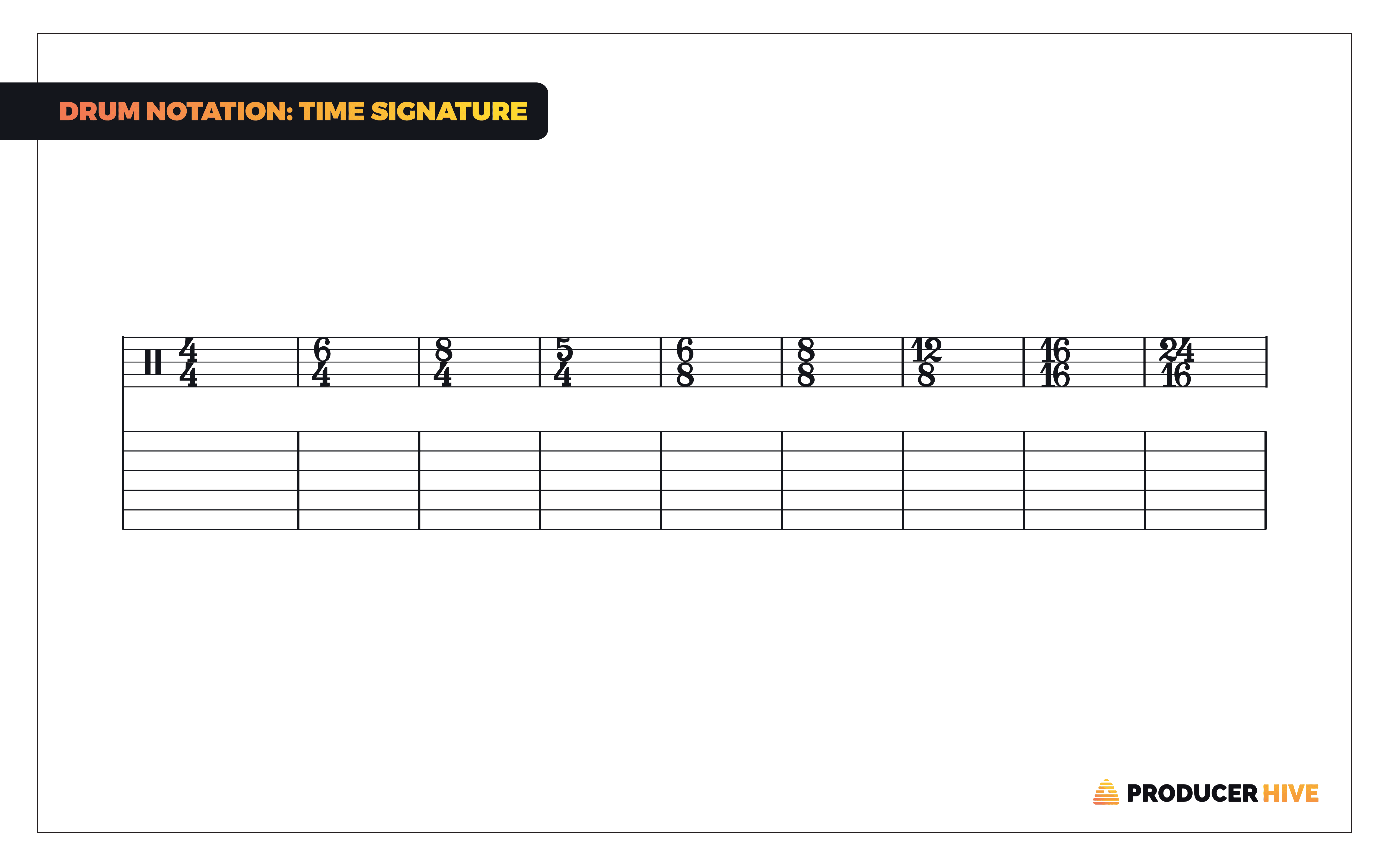
The time signature determines the length of each bar (measure). In most songs, it remains the same throughout the notation and is only present at the very beginning of the song.
The two numbers at the beginning of the notation further explain this – the top number indicates the number of beats in each bar while the bottom one dictates its value. (e.g. 4/4 equates to four ¼ notes, 6/4 equates to six ¼ notes).
Time signatures can change on multiple instances within the same song. The indicator is placed at the beginning of the bar when the change is supposed to happen.
Tempo
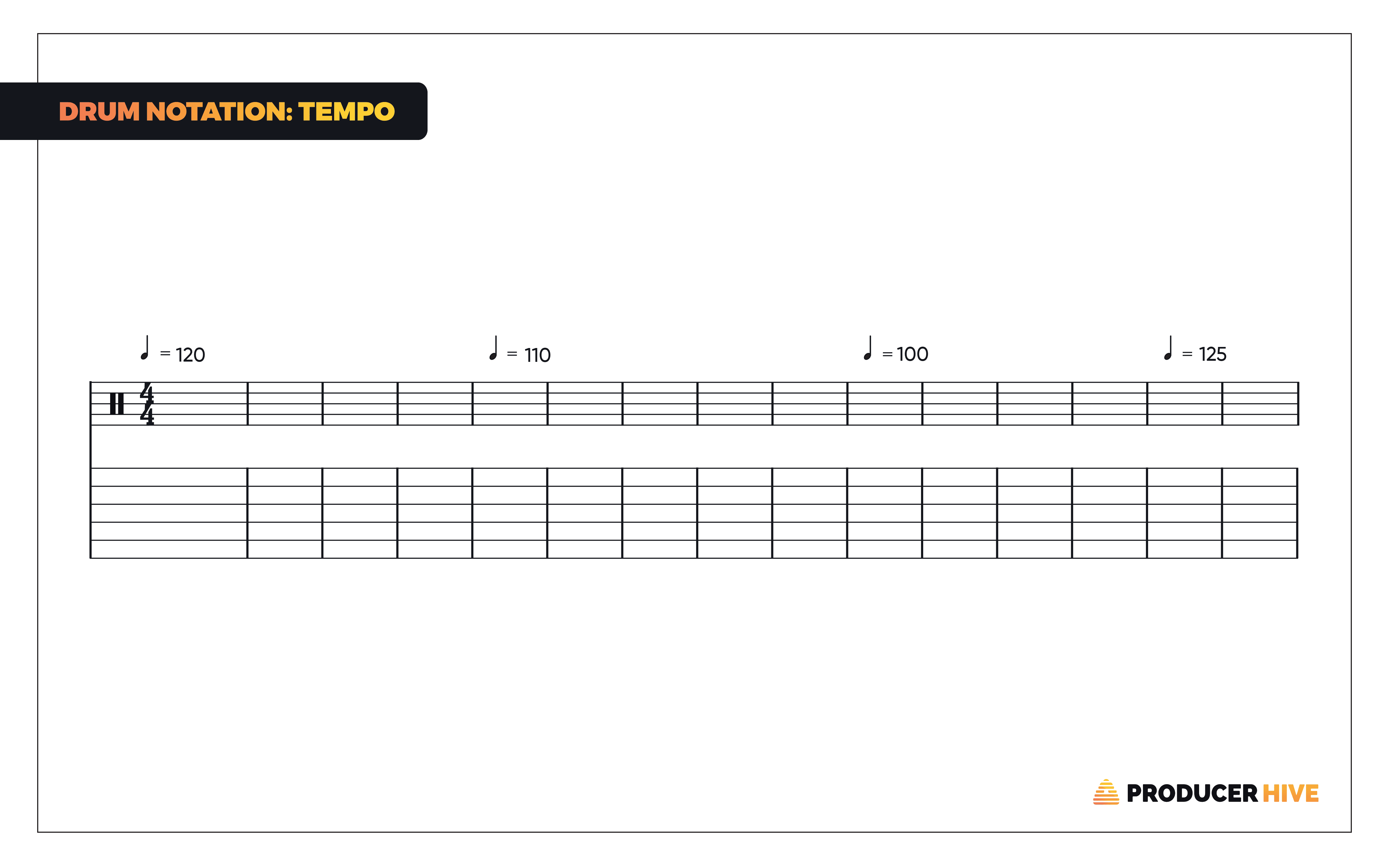
The tempo dictates the “speed” of the song, and it is measured in “beats per minute”. It is tightly linked to the note length values since it dictates how they are depicted in the Staff.
For instance, the standard tempo of 120 will largely use full, half, and quarter notes and only use 16s and 32s for ultra-fast tracks. It is possible to simplify the notation of fast songs by halving (or doubling) the tempo in the notation.
This will not change the actual speed of the song, rather it will simply change the note length value symbols.
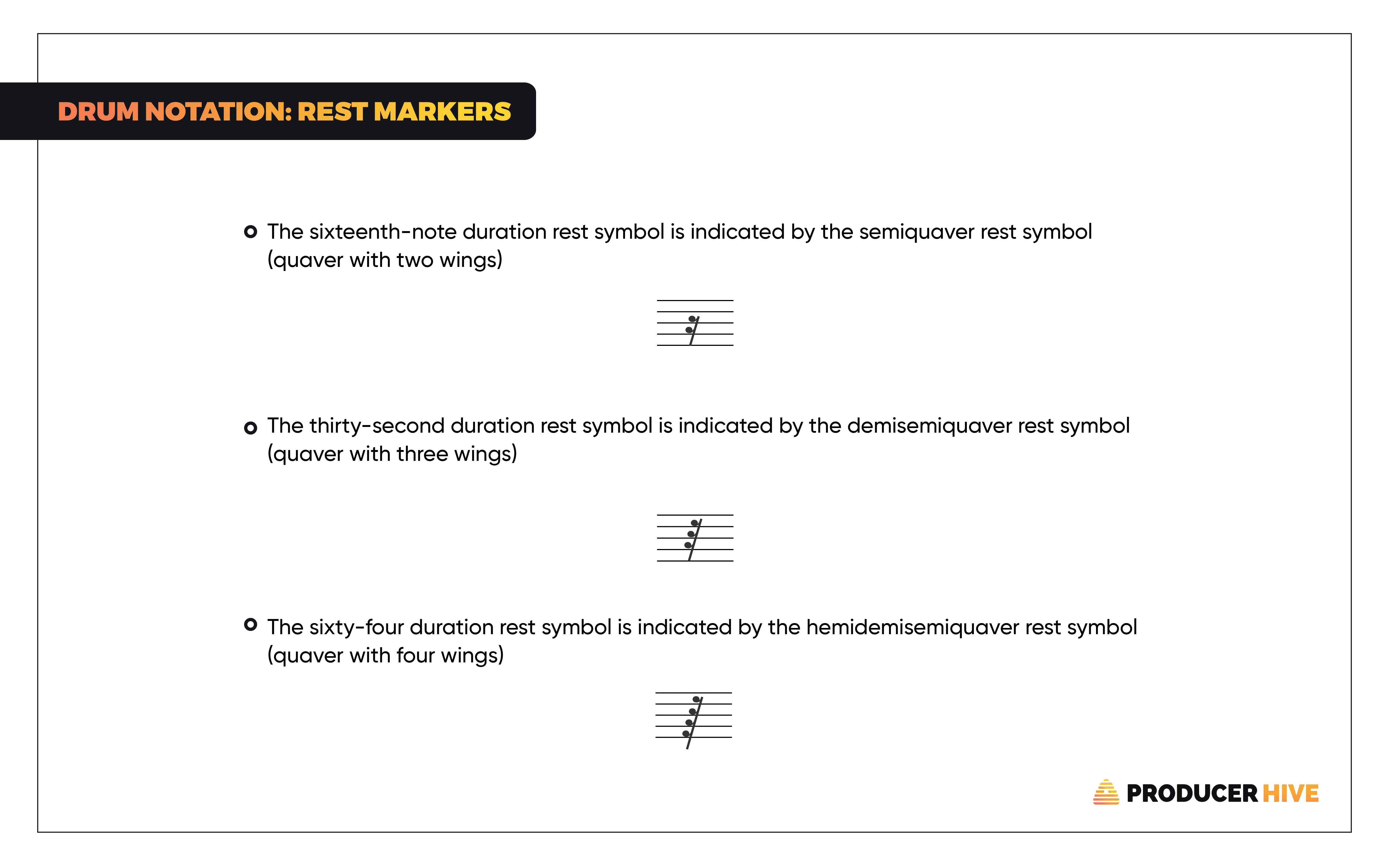
Pause/Rest Markers
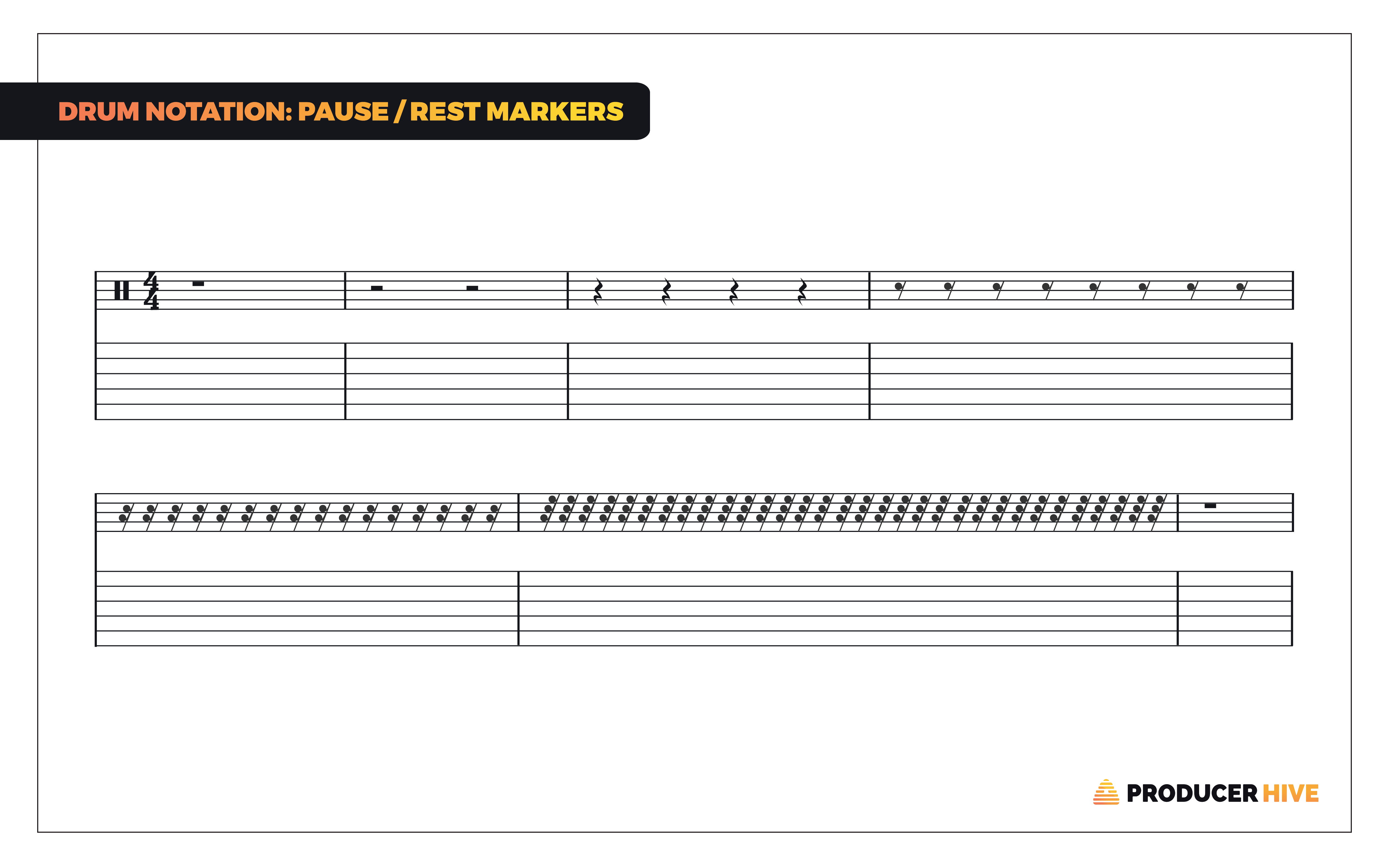
Pause markers have multiple uses in drum tabs. They are commonly used to describe which parts are supposed to be empty (not played), but they can also be used in combination with various phrasing markers to prolong the duration of certain notes (e.g., Crash) while continuing to play other notes within the same bar.
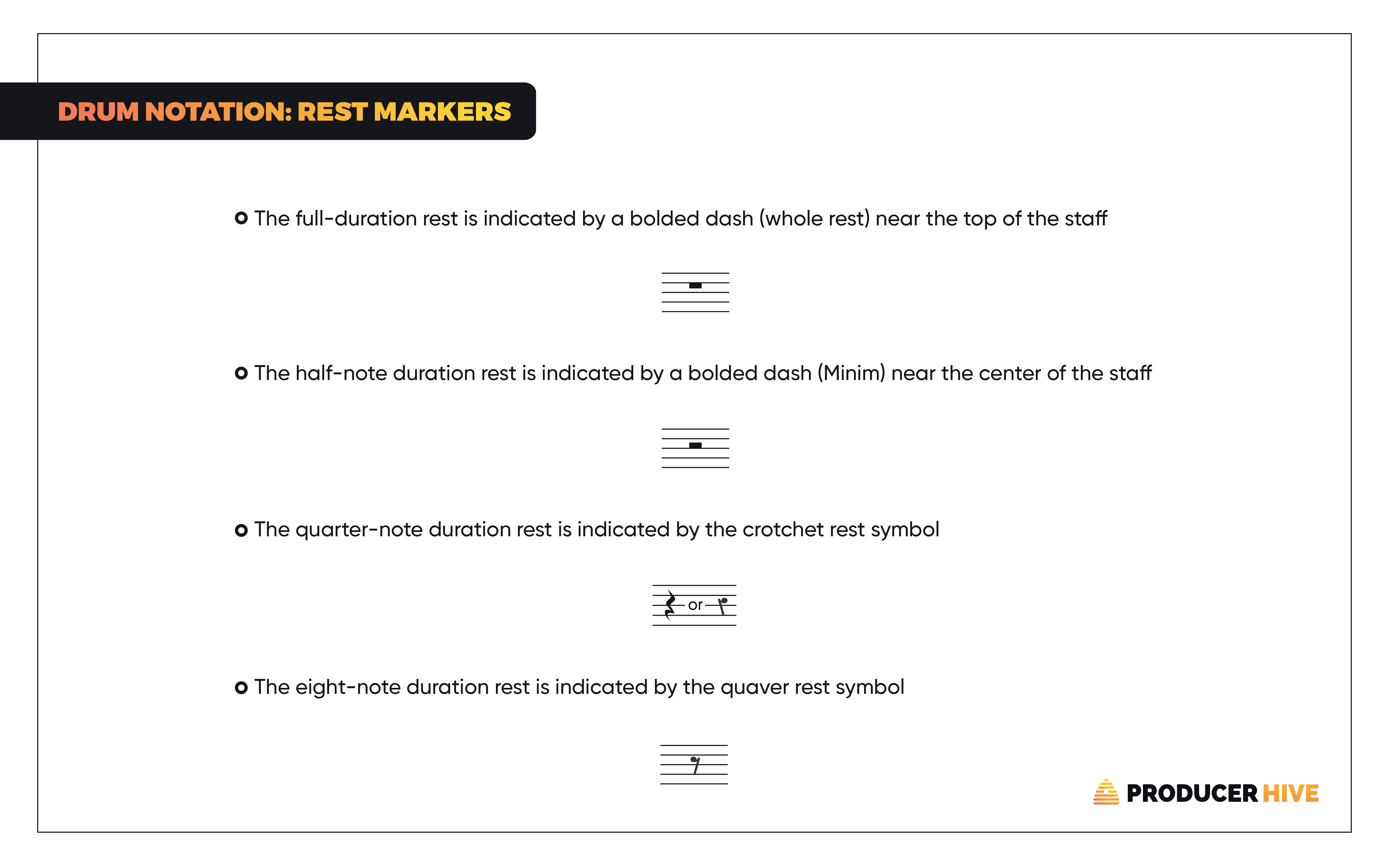
Similar to drum notes, rest markers also have their length values:
Digital Drum Tabs
So far, everything we’ve covered describes what you’ll normally see in “traditional” tabs (handwritten or typed using traditional music theory guidelines). A new form of drum notation sprang up in recent decades, giving rise to even simpler tabs.
These computer-generated tablatures largely use the same symbols but feature a few crucial differences, which we’ll cover in the following sections.
Notes

Instead of rounded symbols, digital drum tabs feature numerical values. A uniform categorization is impossible since each software has a unique notation system.
Tab Playback

Unlike regular tabs that can only be read, digital tabs often come supplied with audio playback features. This is a game-changing function that can enable beginners to learn to read tabs by simply playing along with them.
The audio playback system in some of the most popular digital tab apps is often supplemented by a variety of other functions, such as an onboard mixing table, EQs, volume & pan faders, automatic transposition, and more.
Exportable Drum Tabs

It is possible to export digital drum tabs into various formats (e.g., MIDI, WAV, MP3). One of the simplest ways to learn how to read drum tabs is to convert them into actual “songs”.
This is especially important for digital tab software that does not support audio playback; you can look at the tab in one open window and simply play the exported file to hear what it would sound like.
Wrapping Up
Dozens of other markers exist in drum tabs, most of which are used in more complex songs and orchestral symphonies (like accent symbols, phrasing markers, grace notes, ghost notes, and percussion symbols). However, learning the basics detailed in the sections above will help you understand almost any drum tablature.
Before you go, check out our guide to 10 Basic Drum Beats Every Drummer Should Know!