- De-Esser plugins reduce sibilance in vocal recordings
- Find out the causes of sibilance
- Discover the best free De-Esser plugins
- Also, check out our guide to working with De-Essers!
A De-Esser is a utility plugin used in audio production which attenuates specific frequencies when their peak level crosses a certain threshold “not dissimilar in operation to a compressor”.
They can be used on any audio source but are most commonly associated with removing sibilance from vocal productions.
De-essers can come in hardware and software form, and here we will discuss the five best De-esser plugins you can pick up for nothing.
What Are The Best Free De-Essers?
You might think that a freebie doesn’t equal quality, but in this case, you’d be wrong.
I’ve chosen five of the best de-esser’s that you can download for free right now to use in your productions:
- TDR Nova by Tokyo Dawn Labs (Our Pick)
- Airwindows DeEss (Easiest To Use)
- Dead Duck Free Effects (Best Bundle)
- Tonmann De-Esser
- Lisp by Sleepy-Time DSP
1. TDR Nova by Tokyo Dawn Labs (Our Pick)

At first glance, you might wonder why this one makes the list. After all, it looks more like an EQ than a De-Esser, and that’s because Nova is a multi-band dynamic equalizer.
However, TDR Nova is well known for being suited to several applications in mixing, including de-essing, due to its ability to attenuate specific nodes across the frequency spectrum.
The spectrum analyzer is familiar to anyone who has used a parametric EQ, and four dynamic EQ bands (as well as high-pass and low-pass filters) mean you can get creative and cover several applications with this plugin.
TDR Nova is a great tool to work with. Load it up, and aside from de-essing, you can use it for selective compression (based on frequency), parametric, and dynamic EQ.
One of the aspects I loved about it was how precise it can be when it comes to processing.
Although more complex than a straight-up De-esser, the interface is simple to use and will be familiar to anyone who has ever loaded up an EQ in their DAW.
In that sense, it’s very intuitive and easy to get going, but if you are unsure where to start, it comes with handy presets.
The big draw is the versatility; if you’re after a plugin that is a De-esser and way more, then NOVA is a great choice.
Pros
- Versatility
- Multiband-EQ
- Familiar UI
Cons
- It may be too complex for some users
2. Airwindows De-Ess (Easiest To Use)

Airwindows De-Ess is an easy-to-use De-esser that boasts a user-friendly interface.
The feature count is limited, but that doesn’t stop this plugin from being versatile and an excellent De-esser, especially for engineers who have not used this type of utility before.
As mentioned, the features are somewhat limited; in fact, if you are used to modern plugin suites that boast visually attractive UI’s, you might be mistaken for thinking that this isn’t going to compete with the latter.
However, the intensity, max De-Ess, and frequency sliders are all you need to tame that nasty sibilance!
Using a De-esser can often result in some unnatural artifacts creeping into the processed signal. Especially in extreme scenarios where the plugin works too hard to iron out sibilance issues.
One thing I love about Airwindows De-Ess is that even when a heavy amount of processing occurs, it still retains a smooth, almost unprocessed sound.
If you are dealing with a large amount of sibilance, it may take a bit of tweaking to get the parameters just right, but you’ll know once you’ve hit it.
If you’re not quite in the sweet spot, the plugin makes it quite obvious, meaning it won’t be a case of spending hours on end adjusting the sliders.
Pros
- Simple UI
- Low CPU drain
Cons
- Less versatile than other plugins on this list
- UI may be underwhelming aesthetically for some users.
Review
3. Dead Duck Free Effects (Best Bundle)
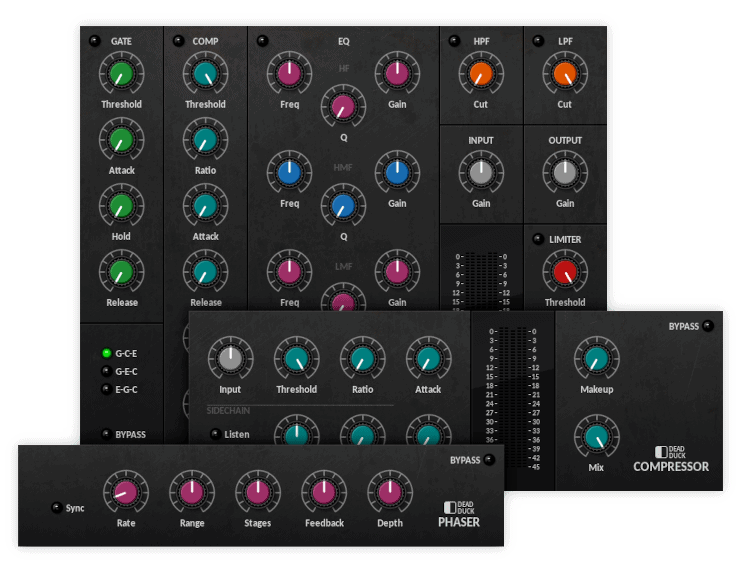
Dead Duck Free Effects comes with a top-notch De-esser, but also included are 26 plugins that are all handy when it comes to sculpting your mix.
Many engineers use this bundle as ‘go to’ VSTs. Think of this as getting a great de-esser while also receiving a nice studio suite in the process.
I won’t go into the bundle itself here and stick to the De-esser, a simple-to-use plug-in that features all of the parameters you would expect from a De-esser, including Threshold, Amount, Attack, Low/High Frequency, and Release.
This De-esser is as you’d expect with a simple-to-use layout, but that doesn’t mean it limits itself.
You’ll be able to smooth out small amounts of sibilance and tame harsh hi-hats without worrying about re-recording.
The big bonus is the plugin bundle; you can complete an entire mix easily from this bundle alone. Of course, we focus on the de-esser, but the rest of the bundle is equally versatile and easy to use.
Pros
- Simple and effective De-Essing
- Comes bundled with other plugins, including modulation, saturation, EQ, and time-based FX.
Cons
- None.
4. Tonmann DeEsser

The Tonmann DeEsser is a well-known option when it comes to free de-essers. It has been carefully designed to easily remove nasty sibilance that inadvertently ruin your mix and send you back to the drawing board.
The Tonmann DeEsser comes loaded with parameters such as Frequency, Bandwidth, Wide Band/Low Pass toggle, Attenuation, Threshold, and Look Ahead.
It also has a handy Listen Mode, which allows you to hear exactly what frequencies are being attenuated from the source signal.
I enjoyed using the Tonmann DeEsser. This plugin is marketed as being designed to eliminate ‘stinging’ sibilance, but any de-esser worth their salt will claim this!
However, the proof is in using the Tonmann. A considerable amount of time and attention has been paid into creating a solid de-esser to help calm any sibilance plaguing your productions.
Particularly sibilance that may be encountered when using compression.
For this reason, the plugin is great for anyone using a hardware compressor on the way into their DAW (let’s be honest; we’ve all made the mistake of overcompressing something and finding ourselves trying to fix it in the mix!).
But also, if you’re a fan of parallel compression and like to slam your vocals, this is a great plugin for keeping that sibilance in check.
Pros
- It may be a good option for beginners as the “Listen” function lets you hear exactly what the plugin is doing.
Cons
- Not an option for Mac OSX users.
5. Lisp by Sleepy-Time DSP
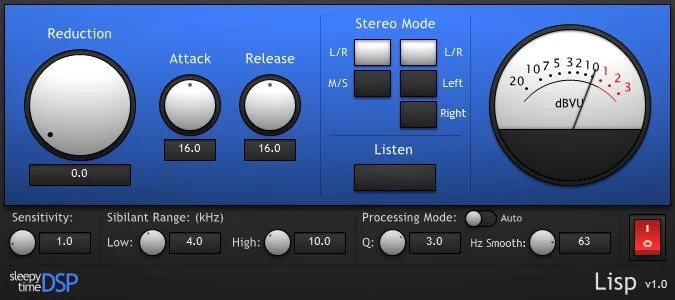
Lisp (or Level-Independent Sibilance Processor) is a great transient-based frequency tracking de-esser that works regardless of the level or input in your DAW.
You won’t find a frequency setting on this one, either. All you need do is load up the plugin, and it will get to work!
Lisp includes many of the parameters you’d expect to see within a de-esser, such as an attack, release, and threshold control, but one of the more unique aspects is how the plugin actually works.
Lisp is internally tuned to frequencies that often pop up in human vocal recordings, which allow it to locate and remove annoying sibilance automatically.
For a free plug-in, I was really impressed by Lisp. There are a lot of ‘intelligent’ plugins on the market that demand hefty price tags.
Considering that Lisp is 100% free-use, it is really impressive and worth considering in your pursuit of the best free De-esser for your home studio.
Pros
- Easy to use due to automatic frequency tracking
Cons
- Lack of options in relation to fine-tuning dynamic control.
FAQs
What Is A De-Esser?
A de-esser is a tool that works similarly to a compressor. Its job is to tame unwanted, nasty frequencies that pop out in the mix.
What Causes Sibilance?
Sibilance is usually the main reason for using a de-esser.
There are several issues that can cause particularly bad sibilance. If you’re finding your sibilance issues are really standing out in your mix, then there are some things you can look out for.
First of all, make sure you aren’t overcompressing your vocal. Using dynamic range compression can be great for controlling a recording or adding some character, but it can also enhance the parts you don’t want.
Check your compressor settings. If there is a lot of gain reduction, then this could be causing the sibilance issues.
Similarly, if you’ve EQ’d your vocal and boosted a lot of high frequencies, then this could bring out sibilance problems within your mix. Combine this with overuse of compression, and you could end up with a really nasty vocal take.
Hopefully, our brief venture into the world of dynamic control and the best free De-essers has given you some insight into how to best tame sibilance in your own productions in a manner that won’t break the bank as a result.
Before you go, check out our guide to 7 Pro Mixing Techniques From 7 Pro Engineers!