

- Learn to pair Anker Soundcore speakers with various devices.
- Find out how to connect two Anker Soundcore speakers.
- Troubleshooting tips for common issues.
- Also, check out our post on the best portable speakers with AUX
In this article, you will learn how to pair Anker Soundcore speakers to various devices. Additionally, we will cover pairing two Soundcore speakers together and provide troubleshooting tips for common issues.
The following devices are discussed:
How To Put Anker Soundcore Speakers In Pairing Mode
To put an Anker Soundcore speaker in pairing mode, follow these steps:
- Turn on the speaker by pressing the power button.

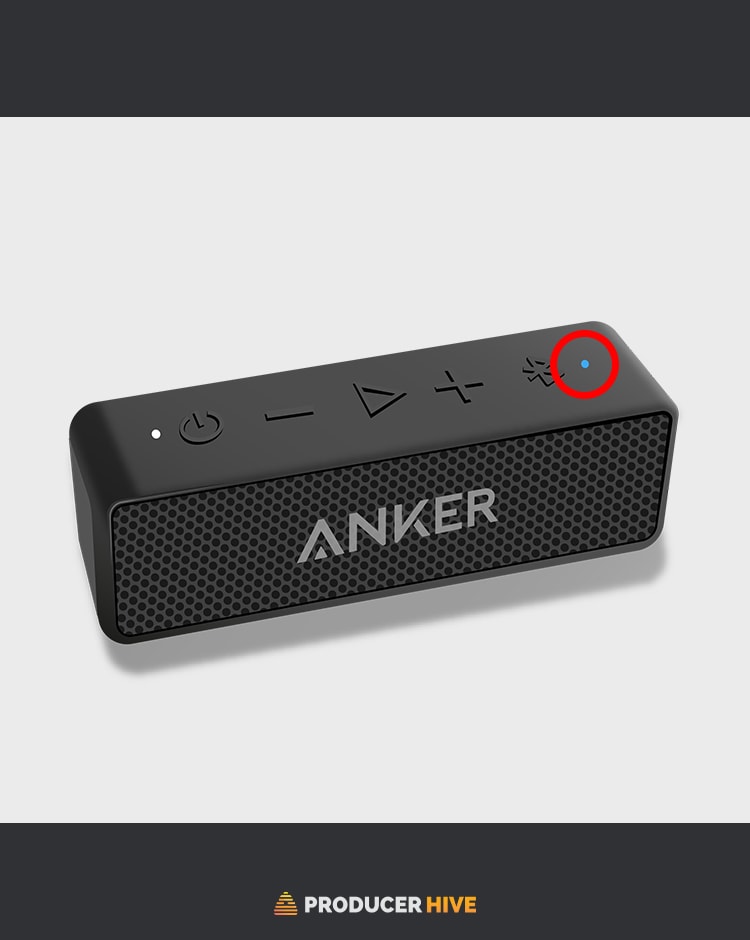
- Hold the Bluetooth button on the speaker until the LED flashes.
- The speaker is now in pairing mode and ready to connect to your device via Bluetooth.


If you’re having trouble pairing your Anker Soundcore speaker, try resetting the speaker by holding the power button for 10 seconds. This should reset the speaker and put it back into pairing mode.
How To Pair Anker Soundcore Speakers
With Android
To connect to Android, follow these steps:
- Ensure your Android device and Anker Soundcore speaker are on and sufficiently charged.
- Turn on Bluetooth mode on your Anker speaker by holding the Bluetooth button until your speaker emits a flashing blue light.
- Open up the Bluetooth menu under Settings on your Android device. Turn on the Bluetooth search for all available Bluetooth-pairing devices.
- The Soundcore Anker should appear under the list of available pairing devices. Select this option to pair with your speaker.
- The Soundcore Anker will indicate that it is connected by emitting a stable blue LED light.


Specific devices may require a 4-digit password to allow for safe pairing. The password for Anker Soundcore is usually 0000 or 1234.
With iOS
To connect to an iOS device, follow these steps:
- Ensure your Apple device and Anker Soundcore speaker are on and sufficiently charged/powered.
- Turn on Bluetooth mode on your Anker speaker by holding the Bluetooth button until the speaker emits a flashing blue light.
- Open the Settings on your Apple device and enter the Bluetooth menu. Turn Bluetooth on to begin searching for a list of available pairing devices.
- Your Anker Soundcore should appear as one of the available pairing options. Select this option to begin pairing.
- Your Anker Soundcore should now be linked to your Apple device. Check that your speaker emits a stable blue light to show that it has paired correctly.


With A Smart TV
To connect to a smart TV, follow these steps:
- Turn on your Anker Soundcore speaker and put it in pairing mode by pressing and holding the Bluetooth button until the LED indicator starts flashing.
- Go to Settings > Remotes & Accessories on your smart TV and turn on Bluetooth.
- Select your speaker from the list of available Bluetooth devices.
- Your speaker will now be connected.
- Enter the passcode “0000“ to complete the pairing process if prompted.


Note: Some older smart TVs may not have Bluetooth connectivity, so you may need a wired connection or a separate Bluetooth adapter to connect your Anker Soundcore speaker.
How To Pair Two Anker Soundcore Speakers Together
Many users might be surprised you can pair Anker Soundcore speakers together for added volume.
To pair two speakers together, follow these steps:
- Turn on both Anker Soundcore speakers. Ensure that each speaker is sufficiently charged and near each other for a strong connection.
- Turn on True Wireless Stereo mode on both speakers. Activate the Bluetooth modes on either speaker by holding the Bluetooth button until their lights emit a flashing blue color.
- A green light will indicate that the two devices have begun pairing. Once they have successfully paired, both speakers will emit a soft tone.
- One speaker can be used for all the controls from this point on. This speaker will emit a stable light, while the other will have a flashing light. You may now use the primary speaker to connect to another playback device.
If your computer speakers are too quiet – check out our solutions here.
Anker Soundcore Pairing Issues (And Solutions)
Some users may experience playback or connection issues while using their Soundcore speakers.
Below is a list of possible solutions for pairing issues:
- Ensure that your device is near your Anker speaker for a stable connection.
- Keep other BlueTooth devices away from your playback device and Anker speaker to ensure a strong connection.
- If you cannot pair your speaker and device, try restarting your speaker by turning it off and on again. Alternatively, restart your playback device and reset the Bluetooth connection.
- Certain pairing problems can be traced to a low power issue. Ensure that your Anker Soundcore speaker and playback device are sufficiently charged.
How To Reset Anker Soundcore Speakers
To reset an Anker Soundcore speaker, follow these steps:
- Turn off the speaker by holding the power button until the LED indicator turns off.
- Press and hold the power button and the volume up button at the same time for 5 seconds.
- The LED indicator will flash red and blue, indicating that the speaker has been reset.
- Turn on the speaker and try pairing it with your device again.
Don’t forget to check out our guide on pairing your Soundcore earbuds with Windows, iOS and Android
Ever wondered if you can take your speaker on an airplane? Here’s the answer!
Before you go, check out our guide to the 7 Loudest Bluetooth Speakers Ever Made!

I am unable to pair ANKER portable speakers, tried all the recommendations